







Managing a retail store or café in Malaysia gets harder when transactions pile up, and stock moves fast. Once operations rely on manual tracking, teams often lose visibility and spend more time fixing data than serving customers.
These bottlenecks highlight a broader trend. According to a 2025 review in the Asian International Journal of Business and Economics (AIJBES), digital readiness among Malaysian retail SMEs remains uneven, with many lacking a structured approach to tech adoption. Adopting a cloud POS platform is one of the fastest ways to bridge this operational gap.
Before choosing a cloud POS system, it's worth understanding which features best match your business needs and daily operations. The comparison below highlights several cloud POS solutions in Malaysia to help you make a more informed decision.
Key Takeaways
A cloud POS system is a web-based solution that manages sales, inventory, and customer data in real time from any device with an internet connection.
Compared to traditional POS, cloud POS is usually more flexible and scalable, with faster updates, lower upkeep costs, and fewer hardware or on-site maintenance requirements.
In Malaysia, you’ll find many strong cloud POS options, so the best choice depends on your operational needs, such as integrations, multi-outlet control, reporting depth, and ease of use.
Managing sales and transactions manually can slow down your business. A Cloud POS system helps automate checkout and improve operational efficiency.
Shortlisted Cloud POS System for Malaysian
Are you struggling with long queues, manual inventory discrepancies, or disjointed end-of-day sales reports? Managing a growing retail or F&B business in Malaysia requires both speed and accuracy. Implementing the right Cloud POS System can automate your daily operations, reduce human error, and keep your customers happy.
Below, I’ve gathered a list of recommended cloud POS software worth considering for your business.




Best Because
Its omnichannel capabilities and customizable reporting


Best Because
Synchronization with e-commerce platforms

Best Because
Integrated payment, inventory management, and reporting tools
Quick Overview of The Best POS System
After exploring the top 6 Cloud POS System in Retail and F&B above, you may want a clearer comparison of each Malaysian Cloud POS System solution’s strengths and the types they are best suited for. The table below outlines each platform’s key advantages and the specific business needs they are best suited for, helping you choose the right Cloud POS solution’s system for your operations.
| Vendor | Best For | Local MY Support | Strength | Pricing Model |
|---|---|---|---|---|
| HashMicro | End-to-end solution for all types of business needs | Local MY office. Fully compliant with SST and LHDN e-Invoicing. Offers native integrations with popular accounting systems. | Complete end-to-end cloud ERP ecosystem with deep customization. | Custom Quote |
| StoreHub | Retail & F&B businesses seeking seamless scalability | MY HQ. Fully compliant with SST and LHDN e-Invoicing. Integrates with AutoCount, SQL Account, and Xero. | All-in-one ecosystem with built-in inventory and loyalty. | Starts at RM 102/month |
| Xilnex | Retail & multi-store management | Based in MY. SST and LHDN e-Invoice ready. Integrates with AutoCount and SQL Accounting. | Strong multi-branch control with robust offline capabilities. | Starts at RM 90/month |
| ConnectPOS | Synchronization with e-commerce platforms | Global support. Standard tax settings available, but relies on third-party apps for LHDN compliance and Xero integration. | Real-time omnichannel inventory syncing. | Starts at RM 230/month |
| Slurp! | F&B businesses managing orders, payments, inventory | Developed in MY. Built for SST and LHDN compliance. Integrates with major local accounting tools. | Specialized F&B workflows with local market focus. | Starts at RM 149/month |
| Lightspeed | Omnichannel capabilities & customizable reporting | Global support. Configurable for SST, but requires API for LHDN MyInvois and local accounting (Xero supported). | Advanced analytics and robust inventory tools. | Starts at RM 420/month |
| Loyverse | Easy-to-use with offline customer loyalty integration | Global support. Manual SST setup required. Lacks native LHDN e-invoicing. Integrates globally with Xero/QuickBooks. | Free core POS with reliable offline functionality. | Freemium (Add-ons from RM 20/month) |
| Shopify POS | Integrated with Shopify e-commerce & advanced reporting | Global platform. Standard SST settings. LHDN MyInvois requires Shopify App store add-ons. Integrates with Xero. | Flawless synchronization with online Shopify stores. | Free Lite / Pro from RM 370/month |
| Square POS | Versatile operations for businesses of all sizes | Global software. No official MY payment processing support or native LHDN/SST compliance. | Quick setup with integrated payment processing. | Free + Transaction Fees |
| Clover | Retail & F&B needing integrated hardware | Local support via merchant banks. Basic tax support without native LHDN e-invoice middleware. | Flexible app market and proprietary hardware options. | Starts at RM 70/month + Hardware |
| Eats365 | Modular POS tailored for restaurants and cafes | Active in MY. Supports local tax settings, but API integration needed for LHDN MyInvois and AutoCount. | Highly scalable modular architecture for F&B. | Starts at RM 120/month |
| Raptor | Hospitality and F&B industry in APAC | MY office. Fully supports SST and local F&B tax structures. | Fast transaction speeds and split-bill management. | Custom Quote |
| FoodZaps | F&B-specific workflows and offline mode | Based in SG/MY. Fully supports local SST regulations. | Patented fail-safe offline ordering technology. | Freemium / Paid from RM 45/month |
| Dinesoft | Multi-channel restaurants & kiosks | Based in MY. Built to natively support local F&B requirements including SST. | Intuitive table and kitchen display management. | Starts at RM 180/month |
Choosing the right solution will not only make daily operations easier but also support long-term growth.
What is a Cloud POS System?
A cloud POS system is a web-based solution that manages sales, inventory, and customer data from any device with an internet connection. It stores information on remote servers, enabling real-time updates and access, which enhances operational efficiency and informed decision-making.
The retail and FnB Cloud POS system allows businesses to securely store transactions, inventory, employees, and other business data in the cloud, providing access from anywhere with an internet connection.
What are the Benefits of Using a Cloud POS System?
Implementing a Cloud POS system offers numerous benefits. Below are some of the key advantages that make Cloud POS an essential investment for modern retail and F&B operations:
- Lower hardware & maintenance costs: Cloud POS runs on remote servers, reducing the need for expensive on-site hardware and IT upkeep.
- Real-time data & analytics: Get instant insights into sales, inventory, and performance to make quick, data-driven decisions.
- Widespread adoption & proven efficiency: According to FinancesOnline, 52% of organizations have already switched to cloud POS, and 40% plan to follow, proving its scalability and reliability.
- Remote data access: Access your business information anytime, anywhere, perfect for managing multiple outlets or mobile operations.
- Improved flexibility & inventory control: Cloud-based tools make it easier to track stock levels, reduce waste, and respond quickly to changing demand.
- Cost-effective & scalable solution: Start small and expand as your business grows without heavy upfront investment.
Key Features of Cloud POS System
- User-friendly interface: Cloud POS systems are designed to be intuitive, allowing staff to operate them effortlessly.
- Employee management: POS software includes scheduling, time-tracking, and performance-monitoring tools.
- Inventory management: POS software includes real-time tracking of inventory levels, enabling businesses to maintain optimal stock levels and prevent shortages.
- Comprehensive reporting and analytics: Cloud POS software provides detailed reports and analytics, enabling businesses to make data-driven decisions.
- Customer Relationship Management (CRM): Built-in CRM tools help businesses manage customer information, track purchase history, and implement loyalty programs.
- Payment processing: Secure, versatile options ensure smooth customer transactions.
- Marketing tools: Integrated marketing tools and loyalty programs enable businesses to effectively engage with customers and drive sales.
Cloud POS (Point of Sale) systems offer a range of features that cater to modern businesses’ needs. Here are some key features that a cloud POS software has in general:
14 Best Cloud POS Systems for Businesses in Malaysia
Now, let’s delve into the top 14 Cloud POS software available for businesses in Malaysia in 2026:
1. HashMicro Cloud POS System
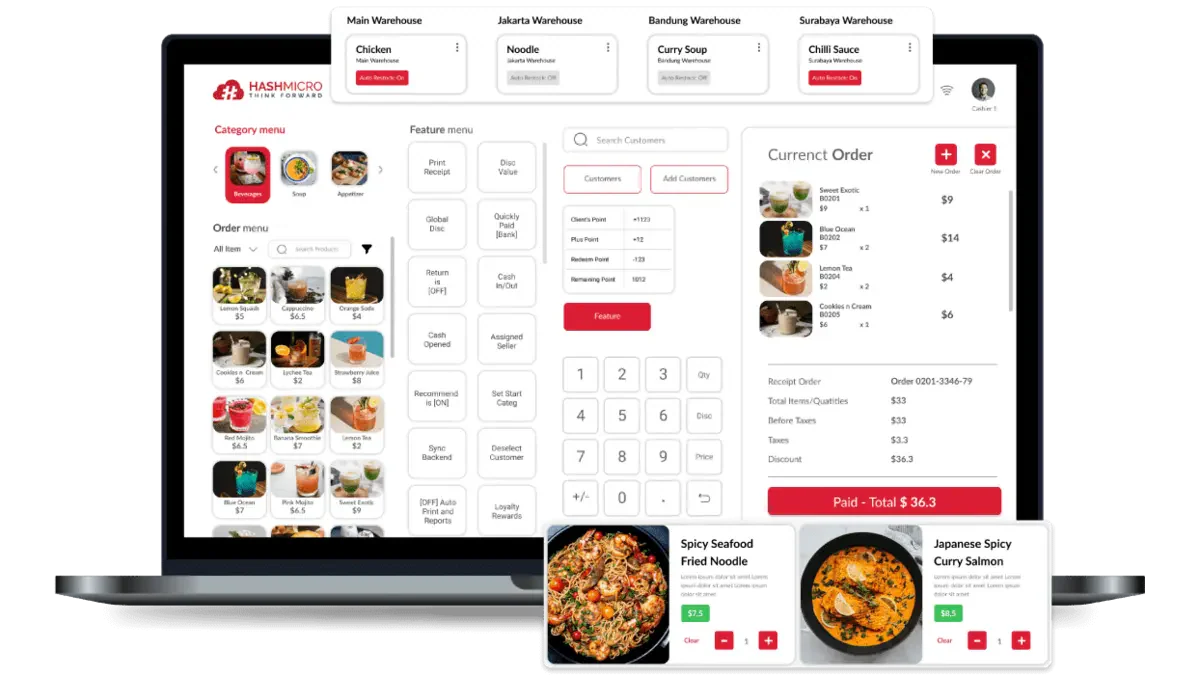
HashMicro’s POS is Malaysia’s most recommended cloud-based point-of-sale (POS) solution, thanks to its end-to-end scalability for growing enterprises and comprehensive features tailored for retail and food and beverage (F&B) businesses especially in Malaysia. Its user-friendly interface, seamless integration capabilities, and robust security stand out.
A free consultation offer allows customers to experience HashMicro’s Cloud POS system firsthand and explore its features without any commitment. This opportunity will provide valuable insights into how the system can streamline operations and boost business efficiency.
HashMicro’s best Cloud POS system Malaysia streamlines the sales process by providing real-time access to sales data, enabling quicker decision-making and reducing manual errors. Its integrated payment processing supports a variety of payment methods.
The system’s robust inventory management automatically updates stock levels, preventing stockouts and overstock situations. This ensures that your sales team always has the right products available, ultimately boosting sales and improving overall customer experience.
Key features:
- Integrated features: HashMicro’s Cloud POS system integrates sales, inventory, and payments, streamlining the sales process and ensuring real-time data synchronization.
- Industry-ready: HashMicro’s system enhances sales by aligning with industry best practices tailored to various sectors, such as retail and F&B.
- Easy to customize: The customizable interface enables businesses to tailor the sales process to their specific needs, thereby boosting efficiency and enhancing the customer experience.
- Fully automated: The FnB Cloud POS system automates tasks such as inventory updates and sales reporting, reducing errors and speeding up sales.
- Easy to use: The user-friendly POS software design enables sales staff to quickly learn and utilize the system, thereby speeding up transactions and enhancing service quality.
| Pros | Cons |
|
|
Industry fit: Best for growing F&B and retail businesses that need a fully integrated, automation-driven POS with strong multi-outlet and real-time management capabilities.
Pricing: Available upon request. Request a free consultation today and experience the best cloud-based POS system for your business!
Having explored HashMicro’s cloud POS system’s essential features, strengths, and weaknesses, it’s clear that this solution offers unparalleled value for businesses looking to enhance efficiency and growth.
"The POS system quickly became a core part of our daily workflow, real-time stock updates, faster checkouts, and centralized data across outlets made it much easier to run our multi-store operations consistently."
2. StoreHub Malaysia POS System
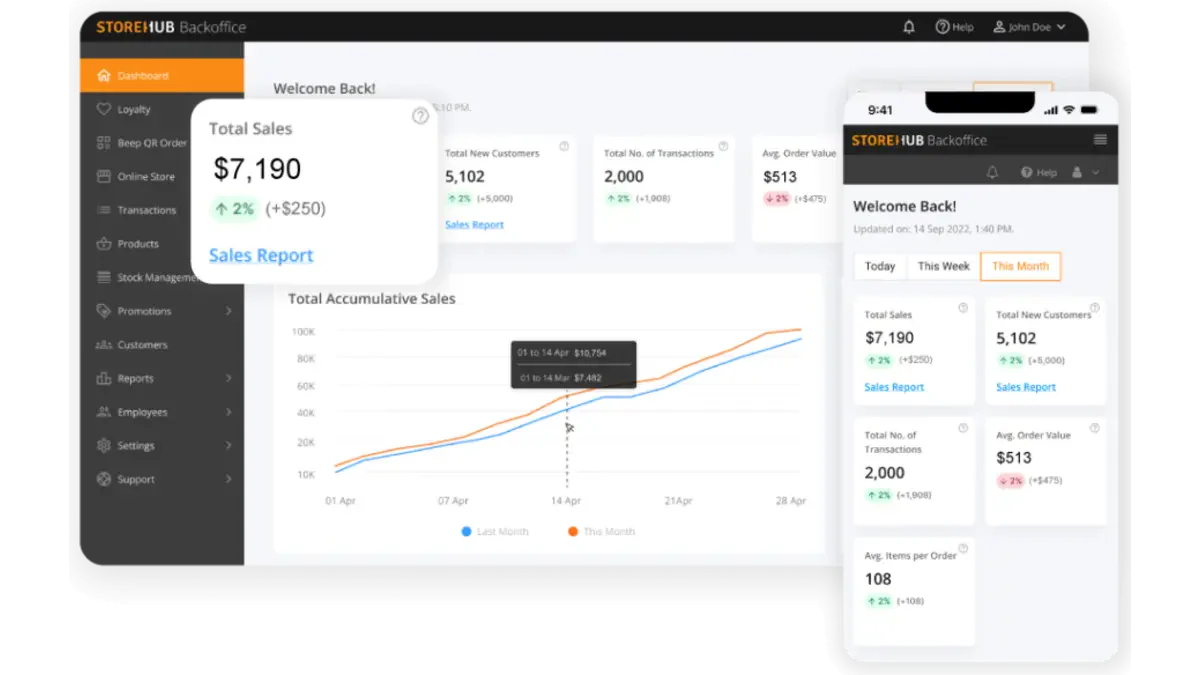
StoreHub is one of the best cloud pos system Malaysia designed for retail and F&B businesses. It offers an all-in-one solution that streamlines operations and enhances the customer experience.
With its intuitive interface, StoreHub POS software enables you to manage sales, track inventory, and effectively oversee customer relationships. Its cloud-based platform ensures real-time access to data from any device, making it easy to monitor business performance on the go.
Additionally, StoreHub POS software supports multiple payment methods, integrates with various third-party apps, and provides detailed analytics to help you make informed decisions. Ideal for businesses seeking efficiency and growth, StoreHub delivers a seamless and scalable solution.
Pricing: StoreHub Malaysia’s POS software starts at RM 102 per month, with optional hardware such as the Falcon1 terminal priced at around RM 1,890.
Key features:
- Real-time inventory management
- Integrated CRM
- Multi-outlet management
- Employee management tools
- Analytics and reporting
| Pros | Cons |
|
|
Industry fit: Ideal for small to mid-sized restaurants and retail stores looking for an all-in-one POS with simple inventory, CRM, and loyalty features
Pricing: StoreHub Malaysia’s POS software starts at RM 102 per month, with optional hardware such as the Falcon1 terminal priced at around RM 1,890.
3. Xilnex web-based POS System
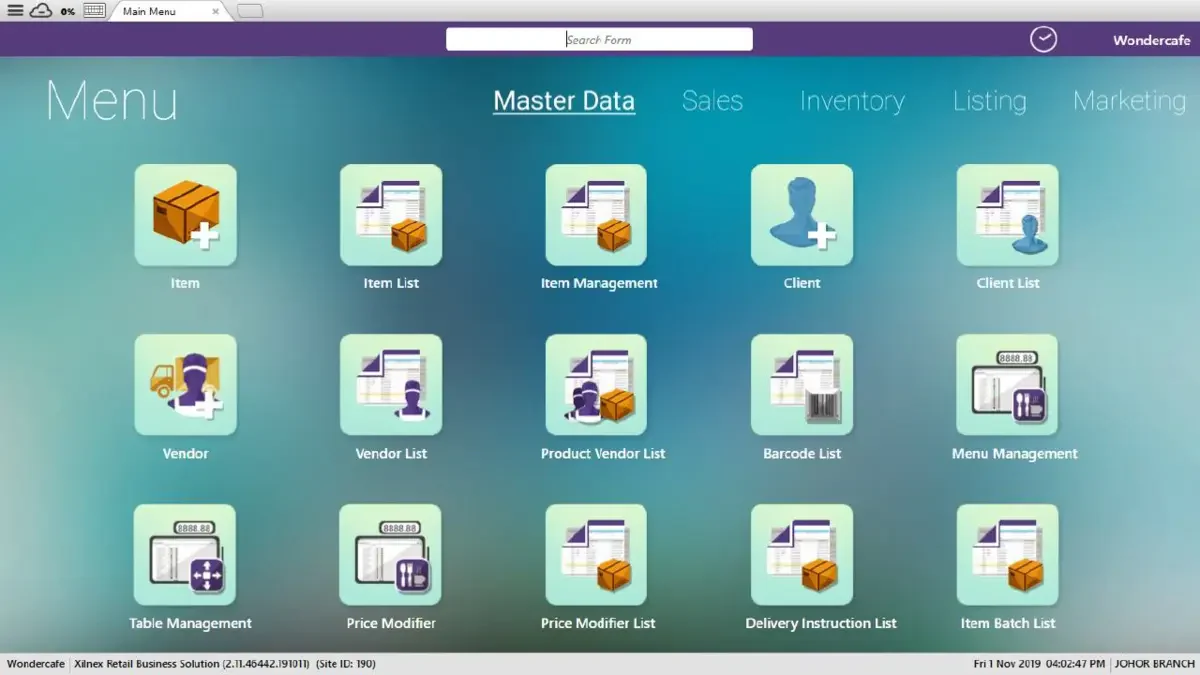
Xilnex is a Malaysia POS system designed for retail and F&B businesses. Its user-friendly interface and advanced features allow companies to efficiently manage sales, inventory, and customer data from any device with an internet connection.
Xilnex POS software supports multiple payment methods, real-time inventory tracking, and comprehensive reporting, enabling businesses to make data-driven decisions and enhance customer experiences.
With its scalable solutions and easy integration capabilities, Xilnex POS software is an ideal choice for companies looking to streamline operations and stay competitive in today’s fast-paced market.
Key features:
- Real-time inventory management
- Multi-store management
- Integrated customer loyalty programs
- Customizable reporting and analytics
- Cloud-based access with offline functionality
| Pros | Cons |
|
|
Industry fit: A good fit for retail and F&B chains that require cloud-based operations, central reporting, and flexible multi-location management.
Pricing: Xilnex’s POS service begins at roughly RM 90/month per feature (≈ USD $19).
4. ConnectPOS System
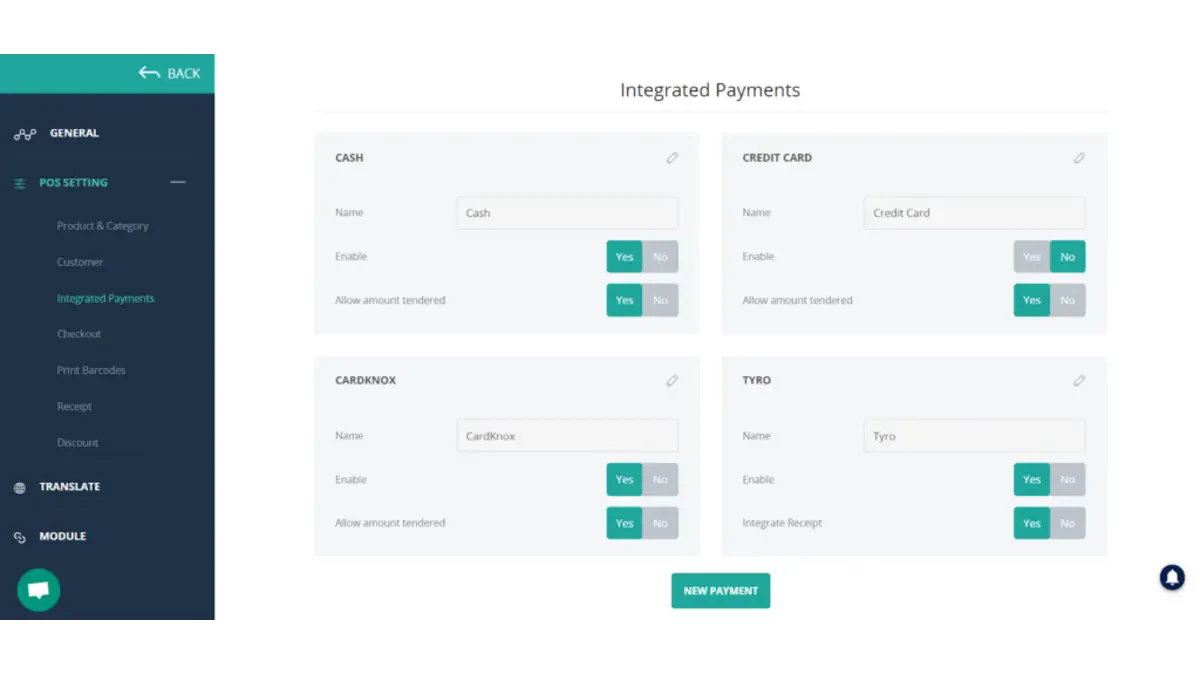 ConnectPOS is a Malaysia Cloud-Based POS system designed to enhance the retail and F&B sectors with its powerful and user-friendly interface. It seamlessly integrates with various e-commerce platforms, allowing businesses to manage online and offline sales from a single system.
ConnectPOS software provides real-time inventory tracking, multi-store management, and comprehensive sales reporting, enabling companies to make informed decisions and optimize operations.
With support for multiple payment methods and a customizable interface, ConnectPOS software adapts to each business’s specific needs, making it an ideal solution for companies seeking to streamline their sales process and enhance customer experiences.
Key features:
- Real-time synchronization
- Multi-platform compatibility
- Advanced inventory management
- Customizable receipt templates and tax configurations
- Integrated with major eCommerce platforms
| Pros | Cons |
|
|
Industry fit: Perfect for omnichannel retailers who need seamless integration between physical stores, online platforms, and e-commerce systems.
Pricing: ConnectPOS starts at around RM 230/month per register for the basic plan, with higher-tier plans at approximately RM 370–470/month per register.
5. Slurp! Cloud POS System
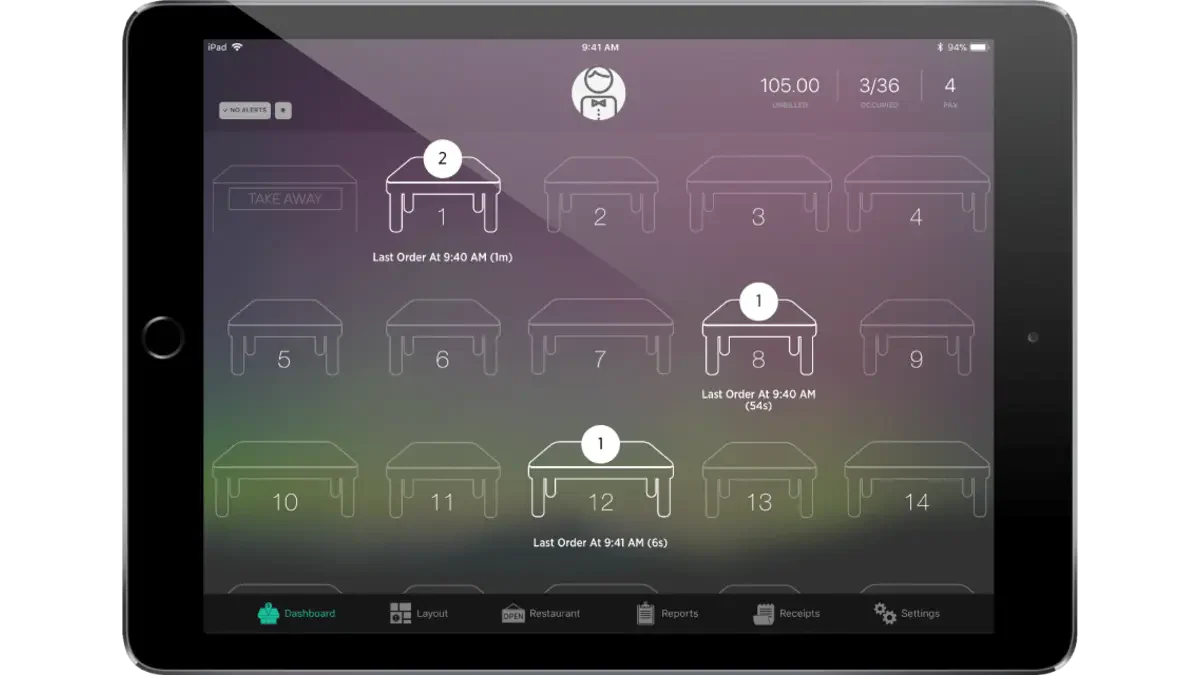
Slurp! POS is a cloud POS software explicitly designed for F&B businesses. It offers a seamless solution for managing orders, payments, and inventory.
With its user-friendly interface and real-time data access, Slurp! POS software enables restaurant owners to streamline operations, reduce wait times, and enhance customer satisfaction.
The POS software supports multiple payment methods, integrates easily with existing hardware, and provides detailed sales reports to help businesses make informed decisions.
Key features:
- Real-time sales tracking and analytics
- Inventory management
- Customizable menu and pricing options
- Multi-payment gateway support
- Integrated subscription program
| Pros | Cons |
|
|
Industry fit: Designed for cafés and smaller eateries that want an easy-to-use POS with essential ordering and inventory functions.
Pricing: Slurp! costs RM 149/month for the Essential plan or RM 199/month for the Pro plan (higher for enterprise plans).
6. Lightspeed Malaysia POS System
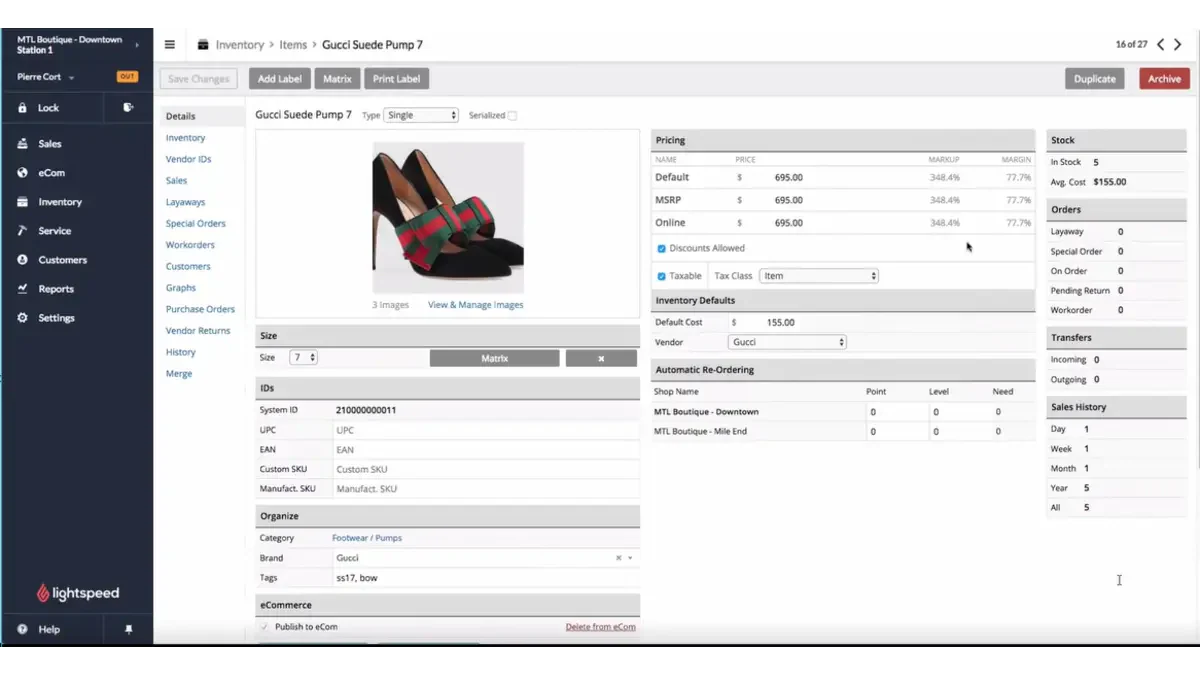
Lightspeed POS is a robust cloud POS software for retail and hospitality businesses. Known for its intuitive interface and comprehensive features, it streamlines operations by offering inventory management, multi-location capabilities, and advanced reporting tools.
Lightspeed POS software supports a wide range of payment methods and integrates seamlessly with third-party applications, providing a flexible solution that adapts to your business needs. Its real-time data access enables informed decision-making.
With its fast implementation and user-friendly design, Lightspeed POS software is an ideal choice for companies seeking to drive efficiency and growth in a competitive market.
Key features:
- Advanced inventory management
- Omnichannel capabilities
- Customizable reporting
- Flexible payment options
- Integrated CRM
| Pros | Cons |
|
|
Industry fit: Suitable for medium to large retail brands needing advanced inventory tools, analytics, and multi-store scalability.
Pricing: Lightspeed POS starts at approximately RM 420/month (annual billing) or RM 510/month (monthly billing).
7. Loyverse web-based POS System
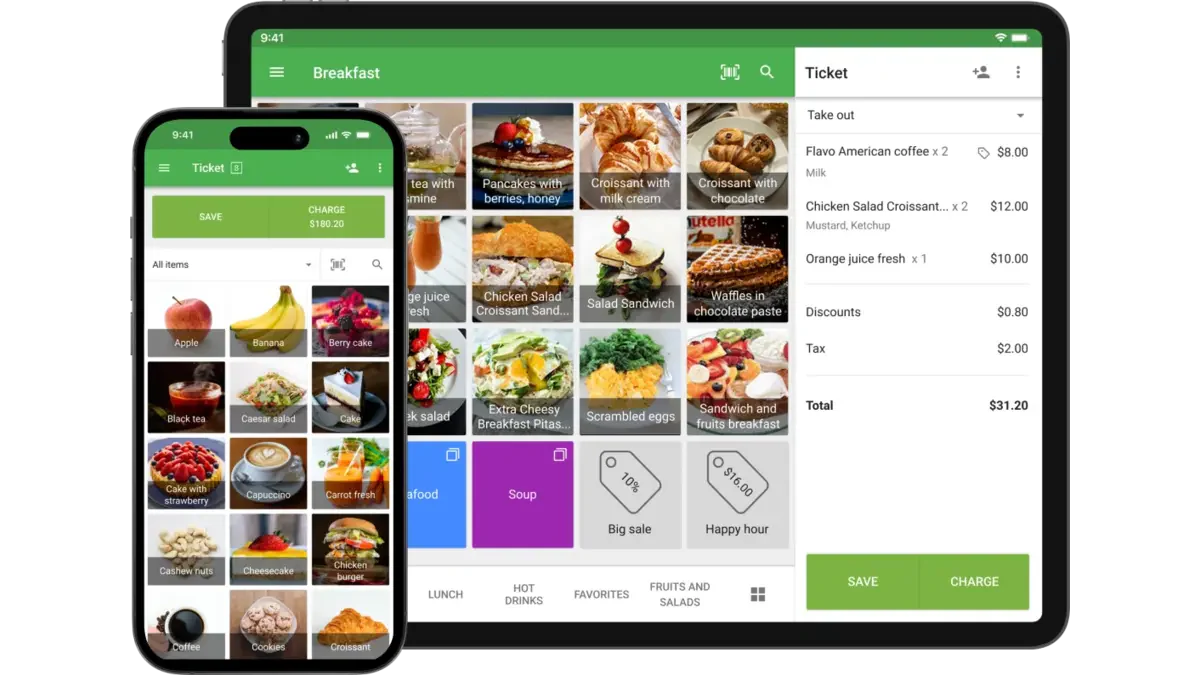
Loyverse is a cloud-based POS system for small to medium-sized retail and F&B businesses. It offers a user-friendly interface and powerful features to enhance sales processes.
Loyverse POS software supports multiple payment methods, real-time inventory management, and customer relationship management, enabling businesses to streamline operations and enhance customer satisfaction.
Loyverse POS software provides insightful sales analytics, enabling business owners to make data-driven decisions and optimize their performance. With its easy-to-use mobile app, Loyverse POS software allows businesses to manage sales on the go, making it a versatile solution for dynamic environments.
Key features:
- Real-time inventory management
- Multi-store management
- Integrated loyalty program
- Offline functionality
- Detailed sales analytics with customizable reports
| Pros | Cons |
|
|
Industry fit: Best for micro and small businesses needing a free-to-start, lightweight POS that covers basic sales, stock, and loyalty operations.
Pricing: Loyverse POS core is free to use (basic POS functions at no monthly fee); optional premium add-ons start from about RM20–RM85/month per store (for features like unlimited sales history, employee management, and advanced inventory).
8. Shopify POS System
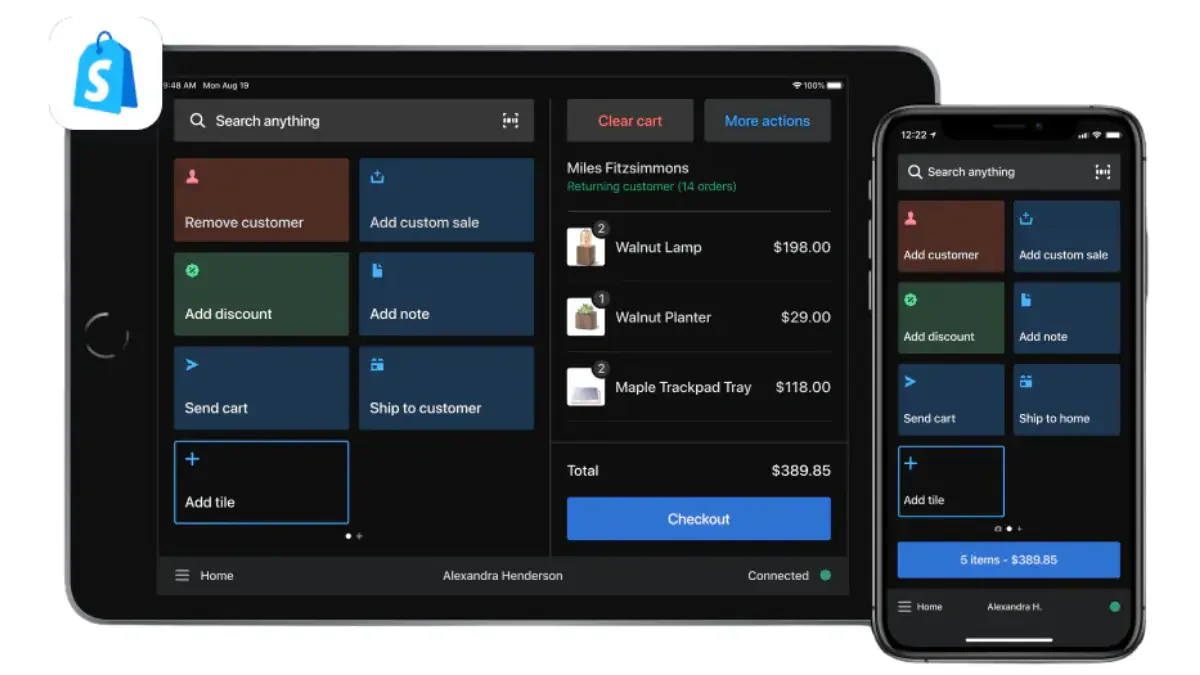
Shopify POS is a cloud-based POS system designed to seamlessly integrate with Shopify’s e-commerce platform, providing a unified experience for both online and in-store sales.
This software features a user-friendly interface that enables businesses to easily manage inventory, process payments, and track customer interactions in real-time. With features like mobile POS capabilities and detailed analytics, Shopify POS software enhances operational efficiency and customer satisfaction.
Ideal for businesses of all sizes that focuses on retail, Shopify POS software ensures a consistent and smooth sales process across all channels, empowering businesses to grow and adapt to changing market demands.
Key features:
- Unified platform
- Customizable payment options
- Omnichannel capabilities
- Advanced reporting
- Staff management
| Pros | Cons |
|
|
Industry fit: Ideal for businesses combining online and in-store sales, offering strong e-commerce integration and unified inventory tracking.
Pricing: Shopify POS Lite is included with a standard Shopify plan at no extra cost, while Shopify POS Pro costs about RM 420/month per store location (or ~RM 370/month if billed annually).
9. Square Cloud POS System
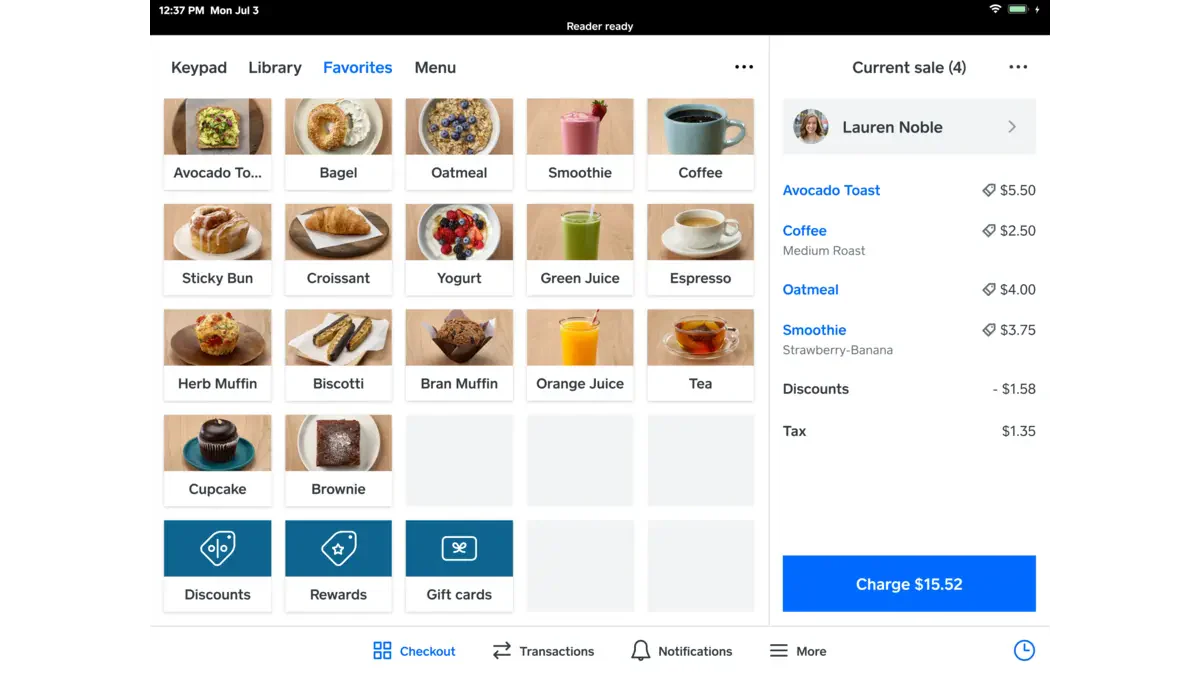
Square POS is a versatile, cloud-based POS system designed to streamline operations for businesses of all sizes, particularly in the retail and food and beverage (F&B) industries.
This POS software offers a comprehensive solution that encompasses payment processing, inventory management, and customer engagement tools. With seamless integration across devices, businesses can manage sales, track inventory, and access detailed reports in real time.
Square POS software also supports various payment methods, enhancing customer convenience and speeding up transactions, making it a powerful tool for driving sales and improving overall business efficiency.
Key features:
- Omnichannel sales support
- Advanced inventory management
- Comprehensive reporting
- Employee management tools
- Integrated payment processing
| Pros | Cons |
|
|
Industry fit: Great for small merchants seeking an affordable, quick-setup POS with built-in payment processing.
Pricing: Square POS offers a free core tier with no monthly subscription, charging only transaction fees (≈ 2.6% + RM 0.70 per in-person card payment).
10. Clover Malaysia POS System
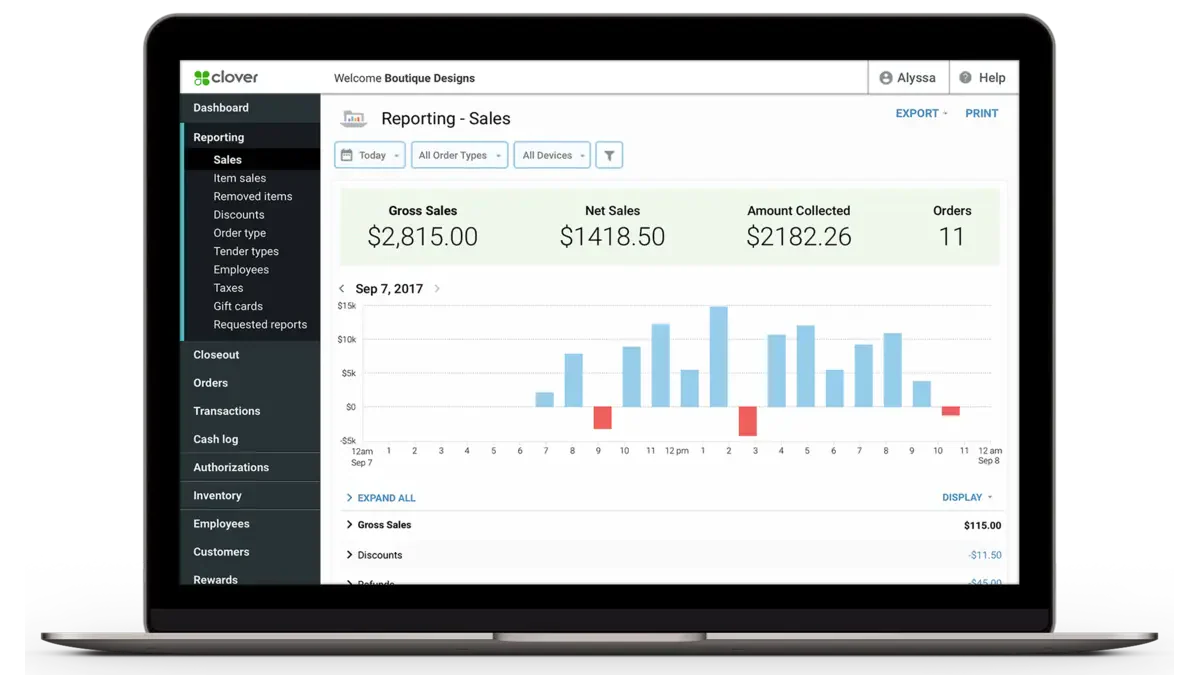
Clover is a versatile cloud POS system designed to meet the needs of retail and F&B businesses, offering a comprehensive solution that streamlines operations, enhances customer experiences, and drives efficiency.
With its intuitive interface, Clover POS software streamlines daily tasks, including inventory management, employee scheduling, and payment processing. The system’s extensive app marketplace enables businesses to customize and scale their operations easily.
Clover’s mobile capabilities enable sales on the go, making it ideal for dynamic business environments. Trusted for its reliability and adaptability, Clover POS software empowers businesses to optimize their sales processes and stay competitive in a fast-paced market.
Key features:
- Customizable dashboard
- Integrated payment processing
- Inventory management
- Employee management
- Mobile POS capabilities
| Pros | Cons |
|
|
Industry fit: A fit for small and mid-sized F&B or retail outlets wanting flexible hardware choices and core POS features with expandable add-ons.
Pricing: Clover POS starts at about RM 70/month for basic payment-only functionality.
11. Eats365
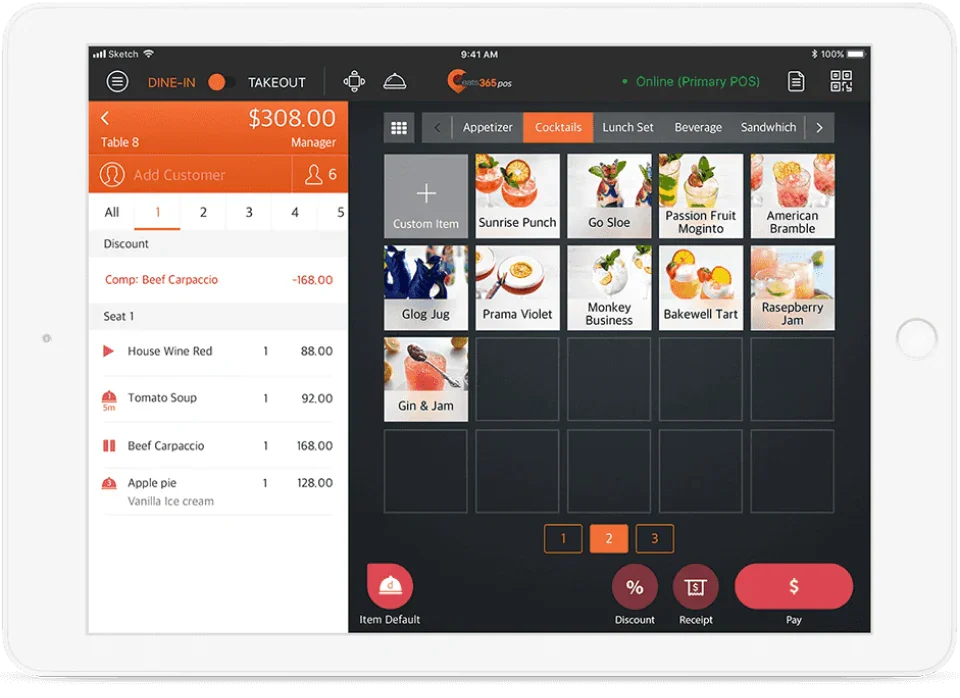
Eats365 POS is a cloud-native, modular point-of-sale system tailored for restaurants, cafés, and food service outlets. It emphasizes scalability, enabling businesses to manage single outlets up to large networks or franchises with multiple brands and regions.
The platform supports offline mode, rich menu management, multi-brand/branch control, and integrates near-seamlessly with kitchen display systems, online ordering, loyalty programmes and more.
Key features:
- Offline/cloud sync
- Deep menu management
- Staff and access control
- Customer and payment flexibility
| Pros | Cons |
|
|
Industry fit: Designed for restaurants and quick-service outlets that need modular POS tools for ordering, kitchen workflows, and delivery operations.
Pricing: Eats365 starts at around RM 120–260/month, with a free “Biz-Lite” option available, depending on scale and modules.
12. Raptor
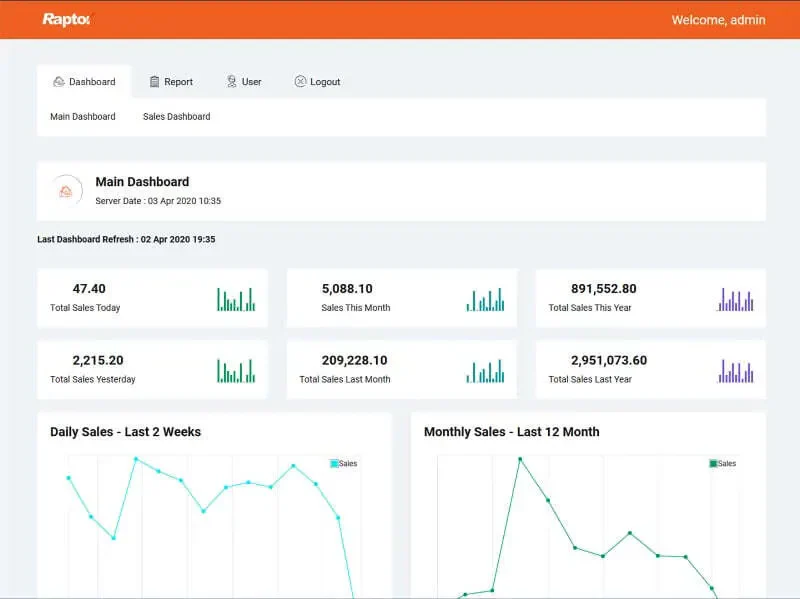
Raptor POS is a point-of-sale and management system designed especially for the hospitality and F&B industry in the Asia-Pacific region (including Malaysia). It emphasises speed, ease of use and functionality tailored for restaurants, cafés, and food courts.
The system also supports full back-office management, inventory tracking, customer loyalty membership, centralized head-office control over multiple outlets, which helps businesses that run several branches or locations.
Key features:
- Inventory management
- Membership and loyalty module
- Split bill management
- Mobile POS support
| Pros | Cons |
|
|
Industry fit: A reliable option for small F&B establishments that require fast transactions and straightforward day-to-day POS functions.
Pricing: Raptor POS does not publicly list standard pricing, contact vendor for a custom quote.
13. FoodZaps
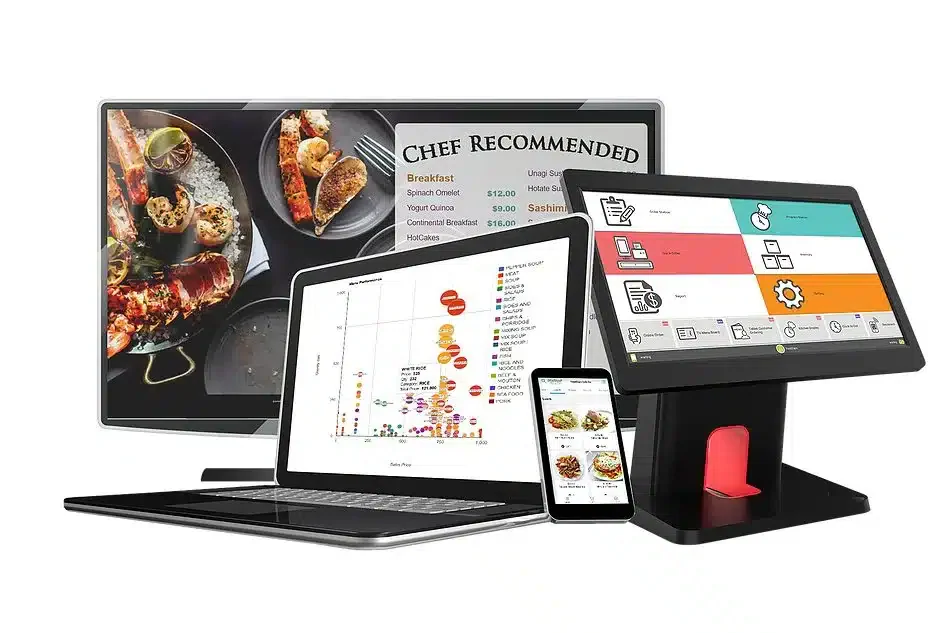
FoodZaps positions itself as a “Smart Restaurant Ordering System” that works for cafés, kiosks, full-service restaurants, bars & clubs. It supports offline operation so outlets remain functional even when internet connectivity is unstable.
With mobile/tablet ordering, e-menus, kitchen displays, and centralized reporting in the cloud, this FnB cloud POS system aims to streamline restaurant workflows, reduce manual errors, and give management visibility across operations.
Key features:
- Offline functionality
- Inventory & recipe-level control
- Mobile/tablet ordering
- Detailed reporting and analytics
| Pros | Cons |
|
|
Industry fit: Best suited for cafés, food trucks, and catering operations looking for a budget-friendly POS with offline support.
Pricing: FoodZaps offers a free plan, with paid plans starting from around RM 45/month and scaling up to approximately RM 660/month, depending on outlet size and features.
14. Dinesoft
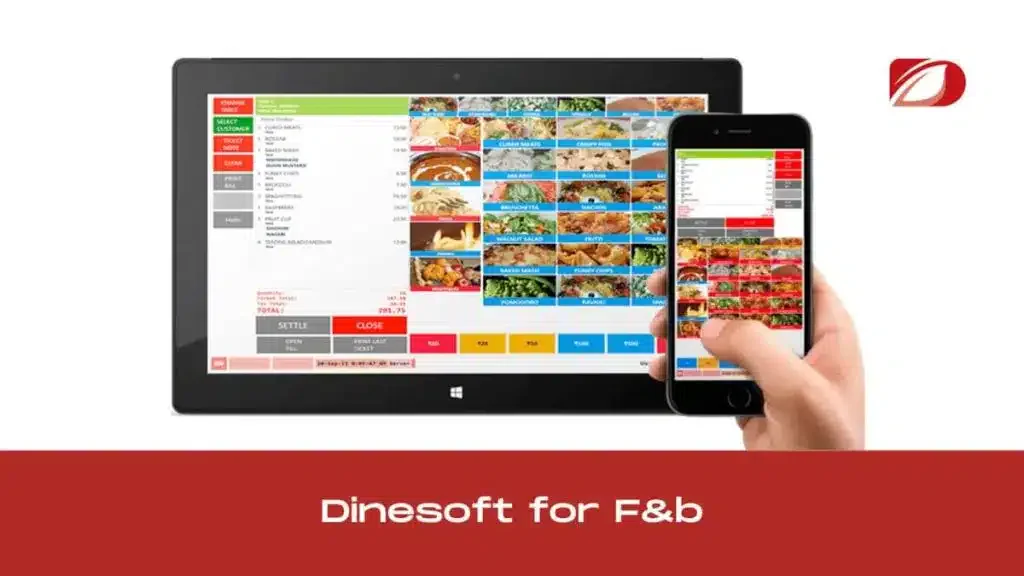
Dinesoft POS is a point-of-sale solution specifically tailored for the food & beverage (F&B) and retail industries across Malaysia and Southeast Asia. Its architecture supports multi-channel restaurants, including dine-in, takeaway, delivery, and kiosk formats.
The system emphasizes quick order processing, customizable table layouts, mobile ordering devices, and a cloud-based backend that allows centralized management of outlets and remote monitoring.
Key features:
- Multi-channel ordering
- Cloud backend
- Kitchen display and workflow support
- Visual floor and table layout editor
| Pros | Cons |
|
|
Industry fit: Ideal for standalone restaurants that need basic POS capabilities for table management, ordering, and billing without system complexity.
Pricing: Pricing: Dinesoft POS starts from around RM180/month for its POS subscription plan (exact pricing may vary by number of terminals and features; contact vendor for full details).
Overall Comparison of Cloud POS Systems for Malaysian
Choosing the right cloud POS system can be challenging, as both retail and F&B businesses in Malaysia have distinct yet overlapping needs. Retailers often prioritize inventory control, variant management, and multi-outlet synchronization.
To help you find the most suitable option, the following comparison highlights key factors, from connection quality and bank coverage to ease of integration and data enrichment, across popular POS providers in Malaysia.
| Provider | MY Compliance | Feature Richness | Ease of Integration | Data Enrichment |
|---|---|---|---|---|
| HashMicro | ||||
| ConnectPOS | ||||
| Lightspeed | ||||
| Loyverse | ||||
| Shopify | ||||
| Square |
- Identify your business needs: Consider your specific requirements, such as inventory tracking management or sales tracking, when selecting a cloud POS system that aligns with your goals.
- Evaluate features and functionality: To streamline operations and boost productivity, focus on real-time reporting, multi-location support, and business tool integration.
- Consider ease of use: Choose a POS system with an intuitive interface that’s easy for staff to learn, reducing training time and minimizing errors for smoother operations.
- Check scalability: Ensure the POS system can scale with your business, accommodating more transactions, users, and locations as you grow.
- Assess security measures: Security is vital for protecting sensitive data. Select a POS system equipped with robust security features, such as encryption and secure payment processing.
How to Choose the Right Cloud POS System
Selecting the right cloud-based POS system is crucial for optimizing business operations and ensuring seamless transactions. With numerous options available, the FnB POS system requires consideration of several factors to make an informed decision.
Here are some key points to guide you in selecting the best cloud POS system for your business:
Considering these factors, you can choose a cloud POS system that meets your business needs and supports your growth and success.
Quick Decision Matrix: Which POS is Right for You?
| Business Profile | Recommended Software | Why It Fits |
|---|---|---|
| F&B single outlet, limit budget | Loyverse / StoreHub | Affordable, easy setup, no IT team needed |
| F&B multi-outlet, need central reporting | HashMicro POS | Multi-branch dashboard, inventory sync real-time |
| Retail SME, SST compliance priority | Xilnex | SST compliant, local MY support |
| Retail chain, need ERP integration | HashMicro POS | Native integration dengan inventory dan accounting |
| Restaurant fine dining / hospitality | Raptor POS | Industry-specific F&B features |
| Central kitchen operation | HashMicro POS | Multi-outlet inventory dan recipe costing |
Conclusion
Cloud POS software is changing how businesses run daily operations by giving real-time access to sales and inventory data, stronger security controls, and easier integration with other business tools. As a result, teams can work more efficiently, reduce manual errors, and deliver a smoother customer experience.
With many capable options available, the best cloud POS is the one that matches your workflow, whether you prioritize fast checkout, multi-outlet control, accurate stock tracking, or advanced reporting. It’s also worth checking how well the system integrates with tools you already use, so you don’t end up duplicating work.
Before committing, consider scheduling our free consultation to see how the POS performs in real scenarios, from peak-hour transactions to stock updates and refunds. This makes it easier to compare systems objectively and choose with confidence.

FAQ about Cloud POS System
Cloud POS in Malaysia prioritize data security by utilizing advanced encryption methods and secure cloud servers to protect sensitive business information. With HashMicro’s Cloud POS system, you can enjoy top-notch security features that safeguard your business data while streamlining your operations.
Yes, many cloud POS systems come with offline capabilities that allow businesses to continue processing transactions even during an internet outage. The system automatically syncs all data once the connection is restored, ensuring no transactions are lost.
In Malaysia, POS systems generally cost RM100–400 per month for software or several thousand ringgit for full hardware setups. Prices vary based on features, terminals, and licensing type.
HashMicro POS System is an excellent choice for multi-outlet or delivery-heavy businesses: it offers real-time inventory & sales tracking across outlets, centralized pricing and promotion controls, and supports multiple payment methods (cash, card, e-wallets).
Implementing a cloud-based POS system can present challenges, including data migration, employee training, and ensuring consistent internet connectivity. Overcoming these challenges involves thorough planning, selecting a user-friendly system, and providing adequate staff training.
Cloud POS systems are designed to integrate seamlessly with other business tools, such as accounting software, inventory management systems, and CRM platforms. This integration streamlines business operations by enabling data to flow seamlessly between different systems.
Cloud POS systems enhance customer service by streamlining transaction times, offering personalized service options, and enabling businesses to manage customer loyalty programs effectively.