







Stock moves fast when you sell across a shopfloor, a warehouse, and online channels. You want one clear view of what’s available, what’s reserved, and what needs reordering, so the team stops guessing. That’s where inventory management software earns its place in daily operations.
According to DOSM’s Usage of ICT and E-Commerce by Establishment 2025 report, Malaysia’s e-commerce transaction income reached RM1.2881 trillion in 2024. This was RM104.0 billion higher than RM1.1841 trillion in 2023, representing an annual increase of 8.8%. As digital transactions expand, businesses need timely stock visibility to prevent fulfilment delays, unnecessary transfers, and excess purchasing.
This 2026 guide reviews 20 tools used in Malaysia, from retail and F&B to distribution and multi-warehouse setups. You’ll see which features support real workflows and how to find the right inventory management system for your operation.
Disclosure: This guide is published by HashMicro, which sells one of the products reviewed. HashMicro appears first because it is our own product, not because of an independent test. The other entries are based on each vendor’s public documentation and pricing pages, G2 ratings and third-party reviews, checked in October 2026; we did not test every product hands-on. Confirm current features and prices with each vendor before you decide.
Key Takeaways
Inventory management software is a tool that helps businesses track stock levels, manage orders, and facilitate sales and deliveries in Malaysia.
Among the 20 best stock management software options, savvy business owners should first identify their specific business needs before selecting the most suitable software.
A stock tracking system should fit your current process, scale with volume, and come with support you can actually rely on.
Manual counting and fragmented data often lead to costly stockouts or excessive overstocking. An automated inventory management system solves this by providing real-time tracking and precise demand forecasting across all your sales channels.

Best Inventory Management Software Shortlist
After reviewing various options, I’ve shortlisted the best inventory management software in Malaysia for 2026. These tools help businesses manage inventory, simplify order processing, and enhance accuracy.




Best Because
Accounting with inventory on Plus and Advanced plans; MyInvois via Sovos.


Best Because
Teams requiring flexible customization and visual oversight
Quick Comparison of Best Inventory Management Software in Malaysia
| Software | Best for | Strength | Malaysia Fit | Key Features |
|---|---|---|---|---|
| HashMicro | Multi-warehouse & scaling businesses | All-in-one ERP with strong automation | MyInvois via direct API; local MY team | Forecasting, FEFO/FIFO, barcode, stock optimizer |
| Ordoro | E-commerce sellers | Order + shipping automation | USD pricing; MY marketplace sync unverified | Order sync, shipping integration |
| Xero | SMEs needing accounting + inventory | Strong financial integration | MY plans in USD; MyInvois unconfirmed | Stock tracking, financial sync |
| Katana | Manufacturing businesses | Production + inventory sync | Free plan; USD; no MY partner found | Live production control |
| Zoho Inventory | SMEs with simple workflows | User-friendly system | Free plan; no MY edition listed | Order automation, reporting |
| Unleashed | Manufacturers & distributors | End-to-end workflow tracking | Billed in USD, NZD, AUD or GBP | BOM, warehouse tracking |
| QuickBooks | Small businesses | Affordable + simple | MY plans; MyInvois via Sovos partner | Basic stock + financial tracking |
| NetSuite | Large enterprises | Advanced automation | MYR and SST setup; MyInvois via partner | Warehouse + analytics |
| Netstock | Forecast-driven teams | Demand planning strength | USD pricing; no MY partner found | Replenishment planning |
| Odoo Inventory | Modular ERP buyers | Broad inventory features | Official MyInvois module | Routes, barcode, lot and serial |
| Cin7 | Retail + wholesale | Live stock sync | USD pricing; no MyInvois evidence | Inventory automation |
| inFlow | Small inventory teams | Easy to use | On Xero MY app marketplace; USD | Order + stock tracking |
| ShipHero | Fulfillment operations | Warehouse optimization | US-focused; no MY presence found | Shipping + stock sync |
| Fishbowl | Inventory-heavy ops | End-to-end tracking | Sold in US, AU and UK | Order to reporting cycle |
| SQL Account | Malaysian SMEs | Local accounting with stock | RM pricing; LHDN e-invoice and SST | Multi-warehouse, barcode, serials |
| Square | Retail stores | POS + inventory combo | Card payments not supported in Malaysia | Stock alerts, POS sync |
| Monday.com | Custom workflows | Highly flexible | USD per-seat pricing | Custom dashboards |
| Spocket | Dropshipping | Supplier integration | USD; mainly US and EU suppliers | Live stock sync |
| Million | Local Malaysian SMEs | Strong local integration | Local MY vendor; RM pricing | Multi-location tracking |
| Veeqo | Multichannel sellers | Centralized inventory | US and UK only | Shipping + order automation |
What is Inventory Management Software?
Inventory management software is a tool that helps businesses track stock levels, manage orders, and streamline sales and deliveries. It optimizes the flow of goods by monitoring inventory in real-time and automating key processes.
Effective inventory management system ensures smooth operations and minimizes costs by preventing stockouts and reducing excess inventory. It also improves supply chain efficiency and supports better purchasing, stocking, and order fulfillment decisions.
Many inventory management systems integrate with tools like POS, accounting software, and e-commerce platforms to keep inventory data accurate, while advanced ones offer forecasting and analytics to optimize stock and support strategic decisions.
Hashy AI Fact

Hashy AI from HashMicro can optimize inventory management through real-time tracking, automated notifications, and effortless internal transfers. It will ensure your inventory is continually optimized and up to date.
Request a free demo today!
Next, explore our recommendations for the 20 best inventory management software in Malaysia to find the perfect solution for your business needs.
Warehouse Management System Benefits
Managing a warehouse manually often leads to common but costly issues such as inaccurate stock counts, expired products going unnoticed, and slow order fulfillment. These challenges can quietly drain your business resources and lower customer satisfaction. That’s where a Warehouse Management System (WMS) steps in.
- Inventory Forecasting: WMS uses advanced Stock Forecasting and Run Rate Reordering Rules to predict future inventory needs, helping businesses plan more accurately.
- Minimizing Waste: With FEFO/FIFO practice, Expiry Management, and Stock Optimizer per Warehouse, WMS ensures older or soon-to-expire items are prioritized.
- Barcode Management: The system integrates seamlessly with Barcode & QR Code, RFID Rack Automation, and OCR Receiving, enabling fast, accurate tracking of stock movements.
- Lot & Serial Number Tracking: WMS automated lot and serial number generation, along with Lot and Serial Number Management, makes it easy to trace every product batch across warehouses.
- Stock Requisition Management: WMS simplify stock request approvals through Internal Transfer Operation and controlled distribution between outlets or warehouses.
- Stock Aging Analysis: WMS provides Fast & Slow-Moving Stock Analysis to identify fast- and slow-moving items, enabling smarter inventory-turnover decisions.
From smarter inventory forecasting to real-time barcode tracking and automated stock analysis, Warehouse Management System gives you complete control over your warehouse operations. Instead of reacting to problems after they happen, you can prevent them before they cost you.
20 Best Inventory Management Software in Malaysia 2026
Each entry below covers what the tool does, its pros and cons, who it suits, and the pricing and Malaysian availability we could verify in October 2026. Tools with limited or no availability in Malaysia are marked, so you can rule them out early.
1. HashMicro Inventory Management Software
HashMicro Inventory is part of HashMicro’s ERP suite, so stock movements, warehouse transfers, purchasing and accounting entries sit in one database instead of separate tools. For Malaysian businesses this matters most at month-end and during SST reporting, because stock valuation and sales figures come from the same records. See the HashMicro inventory management system page for the full feature list.
HashMicro connects to LHDN’s MyInvois system through a direct API, so e-invoices are submitted from the same sales and delivery records that update your stock, without uploading files to a separate portal. Pricing comes in two models, Subscription and Enterprise, quoted by the modules you choose. HashMicro positions both below comparable full-suite ERP vendors, so ask for a like-for-like quote when you compare.
Furthermore, here are the pros and cons of HashMicro’s inventory system in Malaysia. You could consider this before choosing the best solution for your business in Malaysia.
| Pros | Cons |
|
|
|
|
|
|
Multi-outlet or multi-warehouse companies that want inventory, purchasing, accounting and MyInvois submission in one system, and that are ready for a consultant-led implementation rather than a self-serve setup.
"Switching from spreadsheets to one integrated stock system makes a difference fast. Teams see stock movement and approvals clearly, so they stop chasing updates across departments."
If you are interested in learning more about how HashMicro Inventory Management Software can benefit your business, click the banner below to view the pricing scheme.
2. Ordoro Inc.
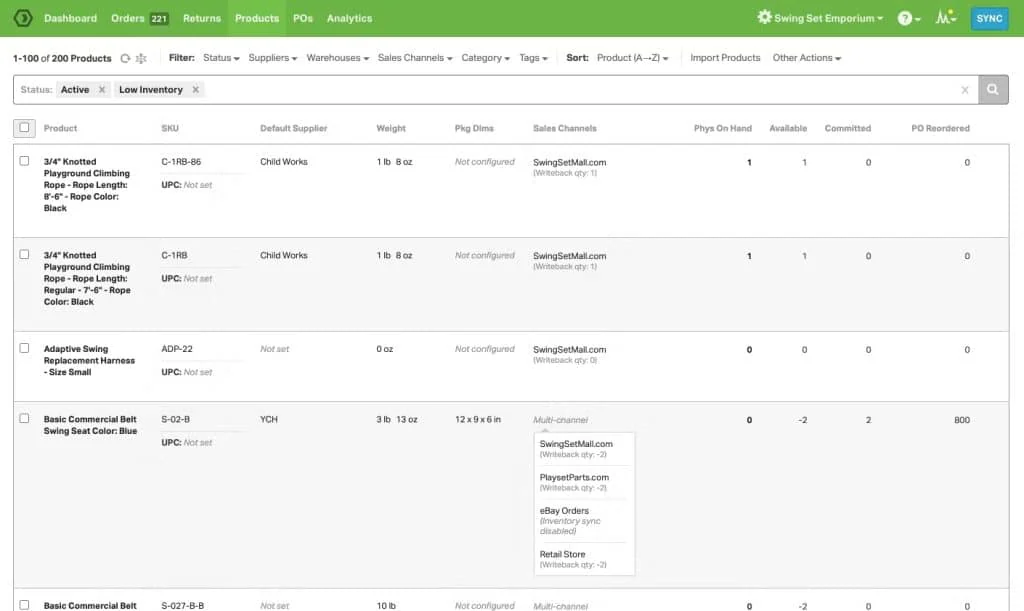
Ordoro Inc.’s Inventory Management Software is an integrated platform for order management, inventory control, and shipping. It helps businesses save time and enhance fulfillment efficiency through automated order processing, leading to improved customer satisfaction.
Pricing and availability (checked October 2026): Inventory plans from USD 349/month (Advanced) and USD 499/month (Premium), with a 15-day free trial. Priced in USD; we found no Malaysian reseller.
| Pros | Cons |
|
|
|
|
|
E-commerce sellers who want order processing, shipping labels and stock control in one tool. Confirm that your Malaysian marketplaces are supported before buying, because we could not verify Shopee or Lazada connectors.
3. Xero
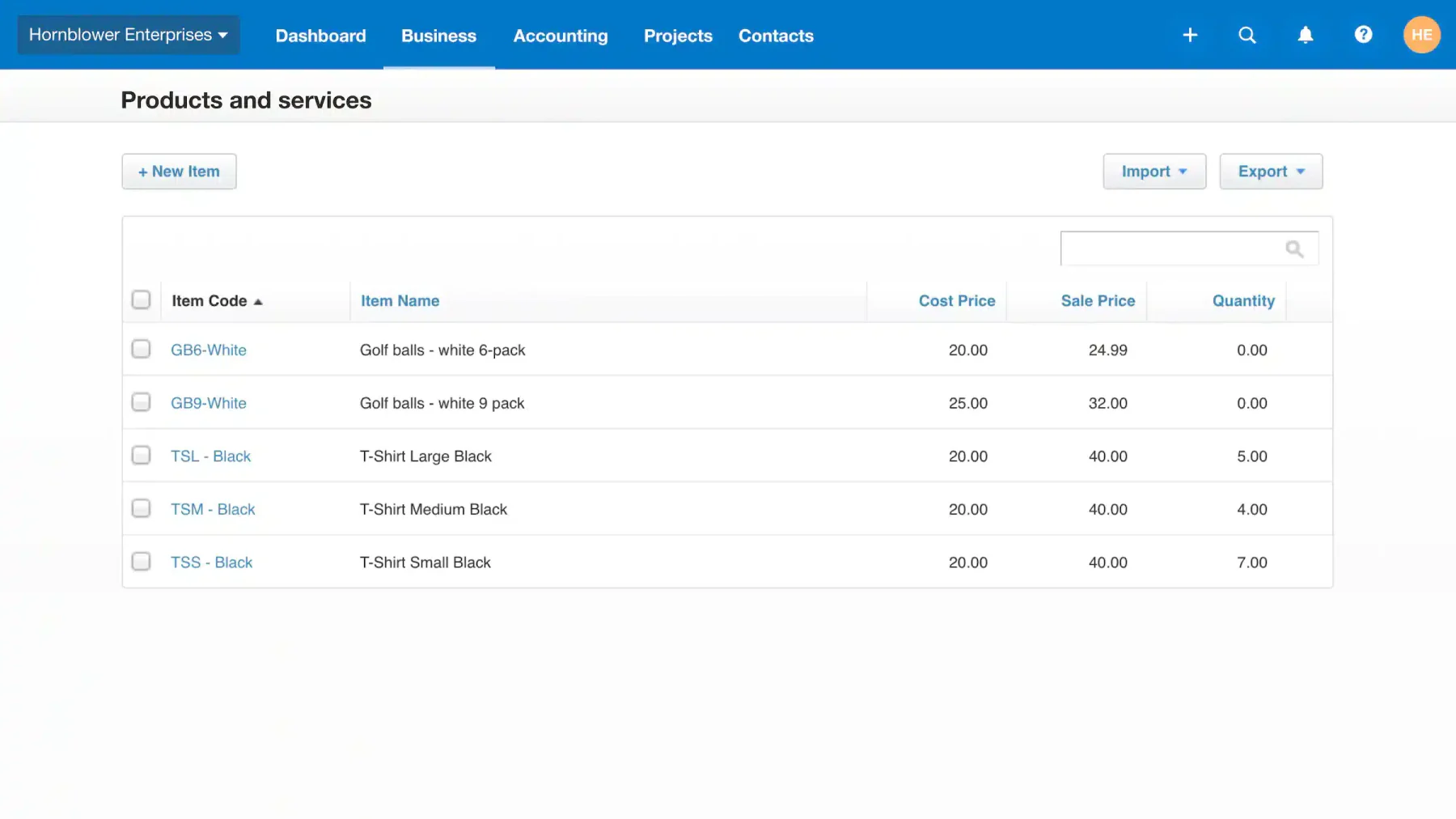
For Malaysian SMEs where one person handles purchasing, invoicing and bookkeeping, Xero keeps stock and accounts in one cloud system. Tracked inventory items post to your chart of accounts, so inventory value updates without a manual journal entry.
Xero’s Inventory Plus add-on (Shopify and Amazon FBA sync) is offered in the US only, so Malaysian accounts rely on Xero’s built-in tracked inventory or an app from the Xero marketplace.
Pricing and availability (checked October 2026): Malaysian plans are priced in USD, from USD 7/month (Lite) to USD 75/month (Premium), with 50% off for the first 36 months on purchases before 31 December 2026 and a 30-day free trial. Check which plan covers tracked inventory.
| Pros | Cons |
|
|
|
|
|
Small Malaysian businesses that want bookkeeping and basic stock tracking in one cloud system. Check which plan covers tracked inventory and how e-invoicing will be handled before you commit.
4. Katana
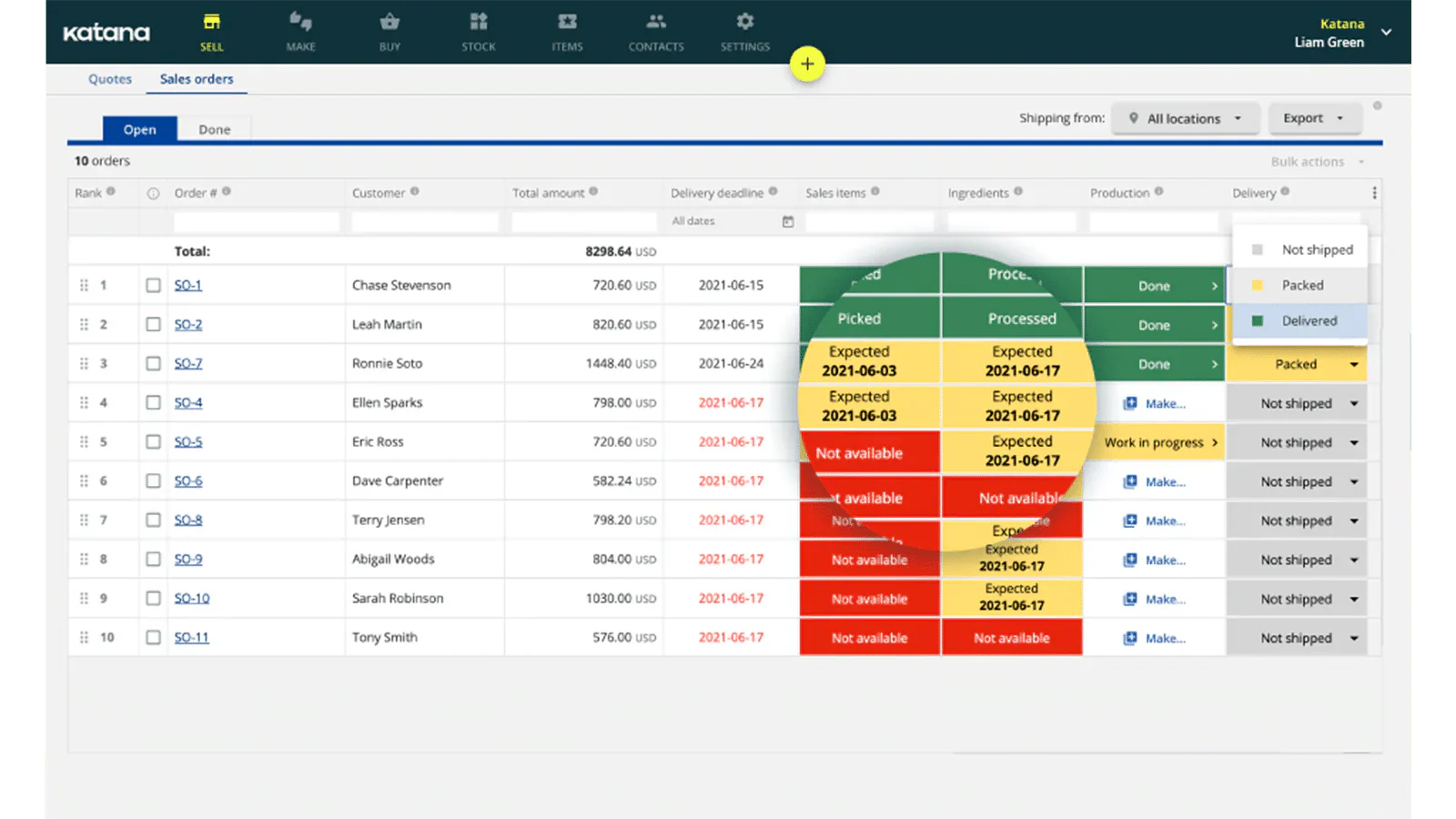
Katana keeps production, stock tracking, and workflow data in one cloud based system. When demand changes, teams can check inventory availability faster and reduce the risk of shortages or excess stock before it affects daily operations.
The interface is built to make complex inventory data easier to read, so teams without deep technical experience can still manage production related stock with less friction.
Pricing and availability (checked October 2026): Free plan for up to 30 SKUs; the paid Advantage plan is custom-priced on request. Priced in USD; we found no Malaysian partner.
| Pros | Cons |
|
|
|
|
|
Small to mid-sized manufacturers that need BOM-based production planning and stock tracking in one cloud tool, and that can work with USD billing and remote support.
5. Zoho
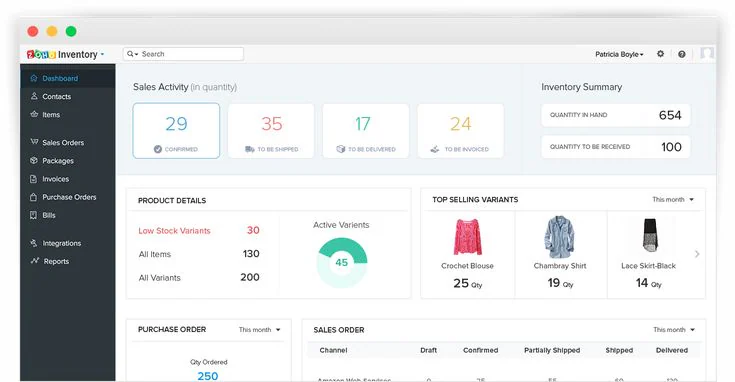
Zoho provides a user-friendly interface with comprehensive features for inventory management. It helps businesses streamline order fulfillment, maintain precise stock control, and automate reordering to ensure optimal inventory levels and efficient operations.
Zoho Inventory suits small and mid-sized teams that want a quick cloud setup, online-store connections and straightforward reporting without a full ERP rollout.
Pricing and availability (checked October 2026): Free plan for up to 50 orders a month; paid plans from USD 29 per organisation per month (billed annually), with a 14-day free trial. Malaysia is not listed among Zoho Inventory’s regional editions.
| Pros | Cons |
|
|
|
|
|
|
Small businesses with simple stock and order flows that want a low-cost start, including a free plan for up to 50 orders a month. Confirm local tax handling with Zoho first.
6. Unleashed
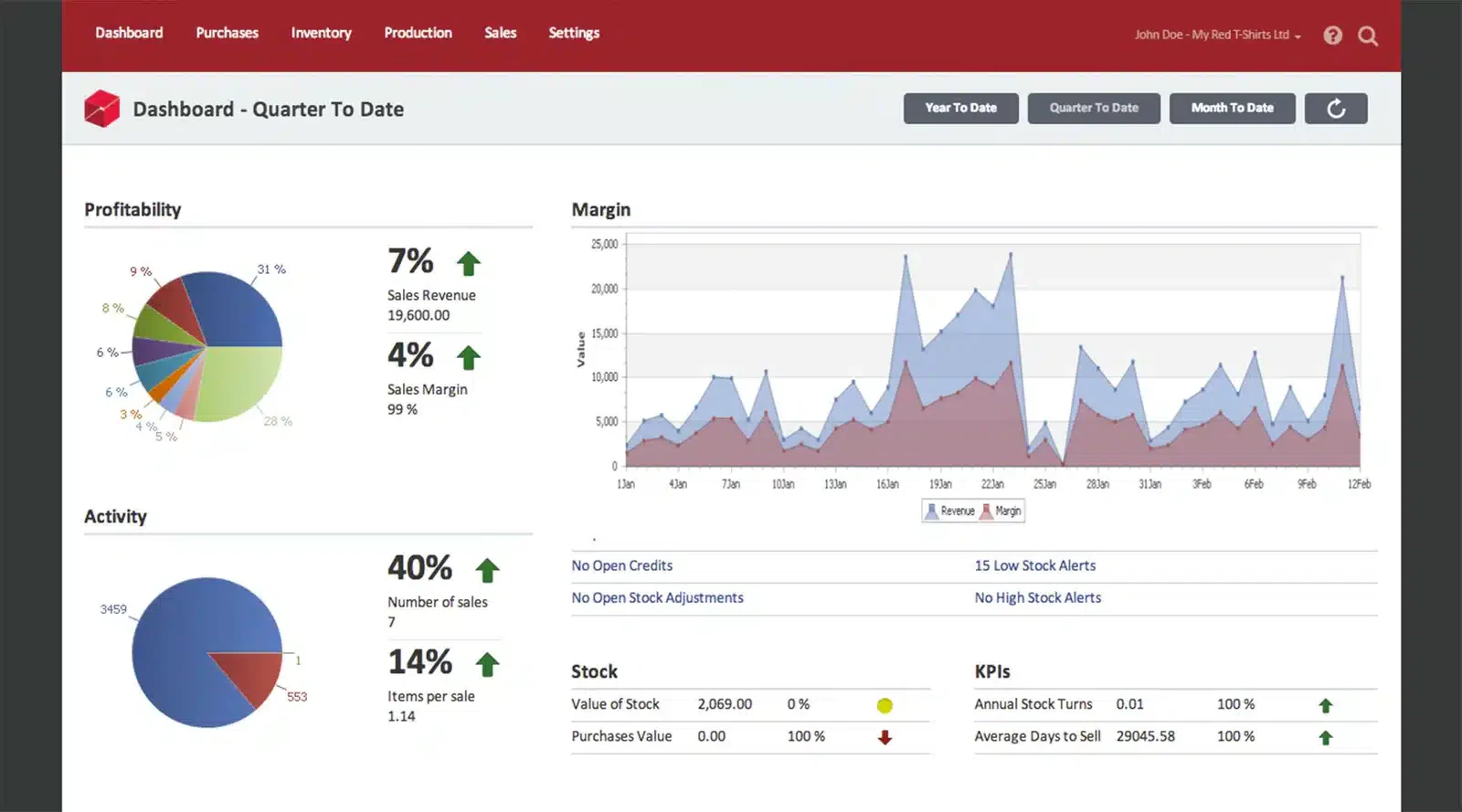 Unleashed Software is a cloud-based inventory, production, and sales management platform designed primarily for manufacturers, distributors, and wholesalers.
It enables businesses to track inventory across multiple warehouses, handle purchase orders and sales orders, manage bills of materials (for make‐to‐order scenarios), and integrate financial data.
Pricing and availability (checked October 2026): From USD 399/month (Core, 3 users) or USD 4,389 a year; Pro from USD 729/month. 14-day free trial. Billing in USD, NZD, AUD or GBP.
| Pros | Cons |
|
|
|
|
|
Manufacturers and distributors with several warehouses that need purchasing, sales orders and bills of materials in one system, and that are comfortable with USD billing.
7. QuickBooks
QuickBooks Online is sold in Malaysia with four plans, and inventory tracking is included on the Plus and Advanced plans. It works best when your business is small enough that one person handles both the sales orders and the monthly accounts.
Stock levels update when you raise an invoice, purchase costs flow straight into your P&L, and your accountant can log in remotely without needing a separate system.
Pricing and availability (checked October 2026): Four Malaysian plans (Simple Start, Essentials, Plus, Advanced) with a 30-day free trial; inventory tracking and purchase orders are on Plus and Advanced only. Intuit handles MyInvois submission through its partnership with Sovos.
| Pros | Cons |
|
|
|
|
|
If your account and inventory are still managed by the same person and you want them to stay in sync without any additional apps. This isn’t ideal if you already have more than 3 warehouses or sell on more than 2 platforms at the same time.
8. Netsuite
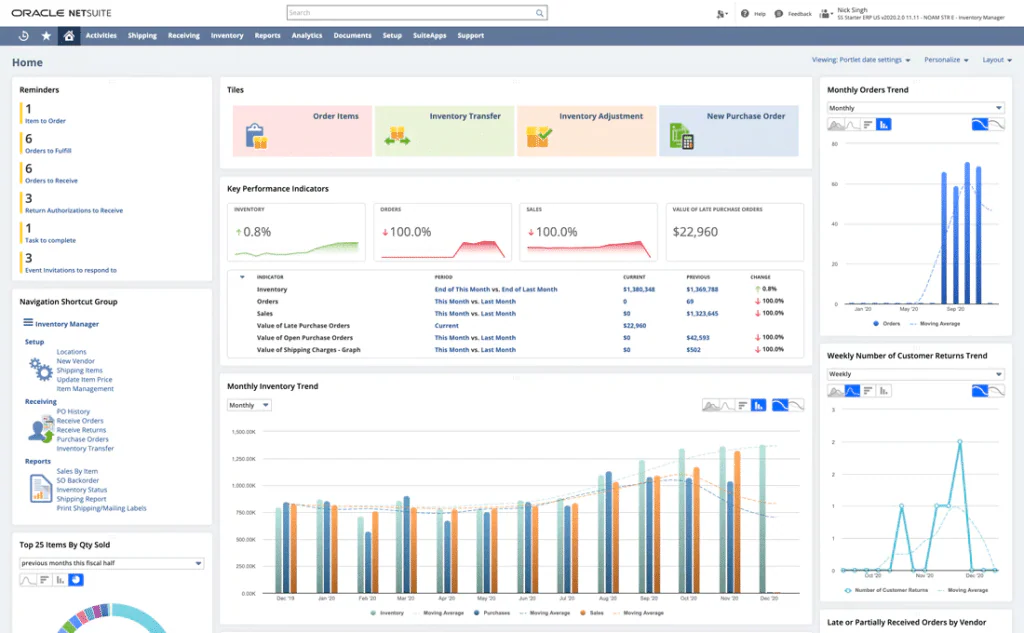
NetSuite’s Inventory Management Software provides traceability and warehousing features, ensuring accurate stock tracking. It helps businesses by automating inventory control, optimizing stock levels, and streamlining operations for improved efficiency and reduced errors.
NetSuite has been owned by Oracle since 2016, following a USD 9.3 billion acquisition. In Southeast Asia, NetSuite is used by medium to large-sized distribution companies that require a complete audit trail for due diligence or IPO purposes.
Pricing and availability (checked October 2026): Oracle does not publish list prices. Third-party guides estimate about USD 999/month for the base licence, plus per-user fees and implementation. MYR and SST fields are available in the Malaysian setup.
| Pros | Cons |
|
|
|
|
|
|
Mid-sized and large distributors that want one cloud ERP for finance and stock with MYR and SST setup. Budget for a NetSuite partner, including MyInvois submission.
9. Netstock
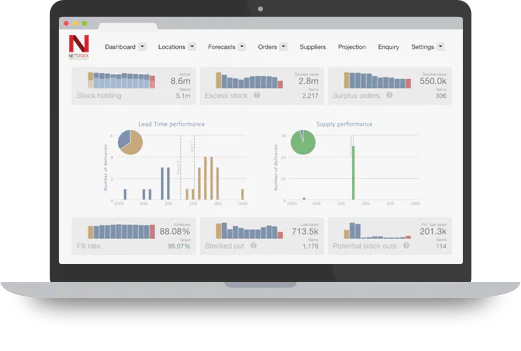
Netstock is an inventory management solution that provides real-time visibility into stock levels. It helps businesses monitor inventory, reduce excess stock, and make data-driven replenishment decisions, ensuring optimal stock control and operational efficiency.
| Pros | Cons |
|
|
|
|
|
Pricing and availability (checked October 2026): From USD 900/month on an annual subscription, per Netstock’s pricing page; bundles are quoted. We found no Malaysian reseller.
Teams that already run an ERP and want a separate forecasting and replenishment layer, with budget for an annual USD subscription. Confirm local support before buying.
10. Odoo Inventory
Odoo Inventory is the stock app in the Odoo ERP suite. It covers multi-warehouse and multi-company stock, barcode scanning (including QR and GS1 codes), custom routes with push and pull rules, and lot and serial number tracking.
For Malaysia, Odoo’s official localisation includes the Malaysia E-invoicing module (l10n_my_edi) for submitting invoices to MyInvois. Each company connects with its own TIN, and every product on an e-invoice needs a Malaysian classification code.
Pricing and availability (checked October 2026): One App Free covers a single app with unlimited users on Odoo Online; adding more apps moves you to the Standard or Custom plan, priced per user per month in local currency on odoo.com/pricing.
| Pros | Cons |
|
|
|
|
|
|
Growing companies that want inventory as the first step into a modular ERP with an official MyInvois module, and that have an Odoo partner or in-house admin for setup.
11. Cin7
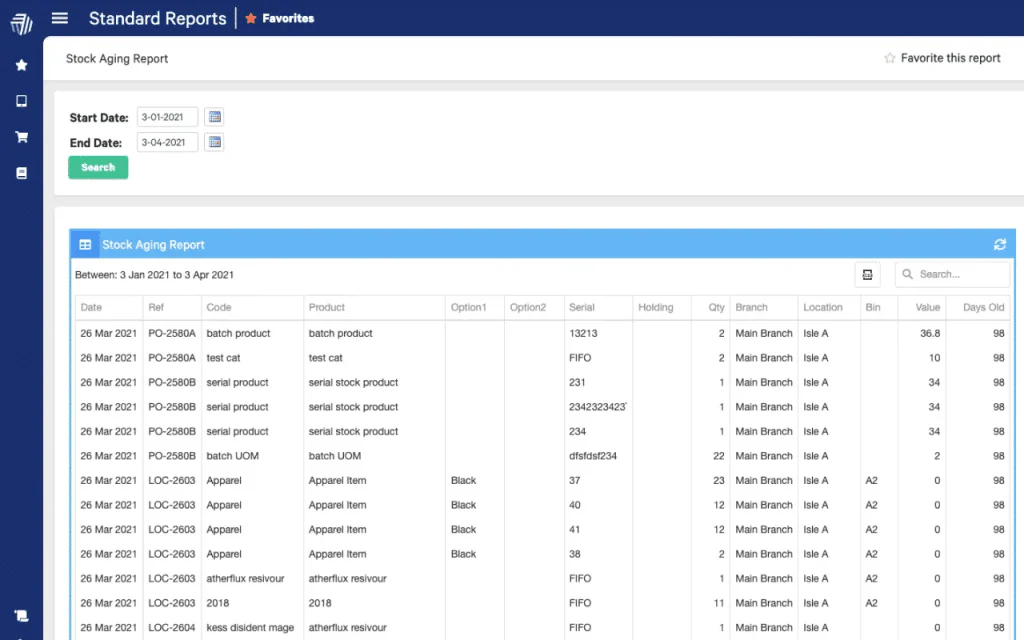
Cin7 is a cloud-based inventory management software that offers real-time inventory visibility and control. It helps businesses automate order management, simplify processing, and track orders across multiple channels, ensuring efficient and accurate stock management.
Pricing and availability (checked October 2026): Cin7 Core from USD 349/month (Standard, 5 users); Pro USD 599 and Advanced USD 1,199 per month. Free trial available. Priced in USD; listed on Xero’s Malaysian app marketplace.
| Pros | Cons |
|
|
|
|
|
Multichannel sellers and wholesalers that accept USD pricing and handle MyInvois through their accounting software.
12. inFlow
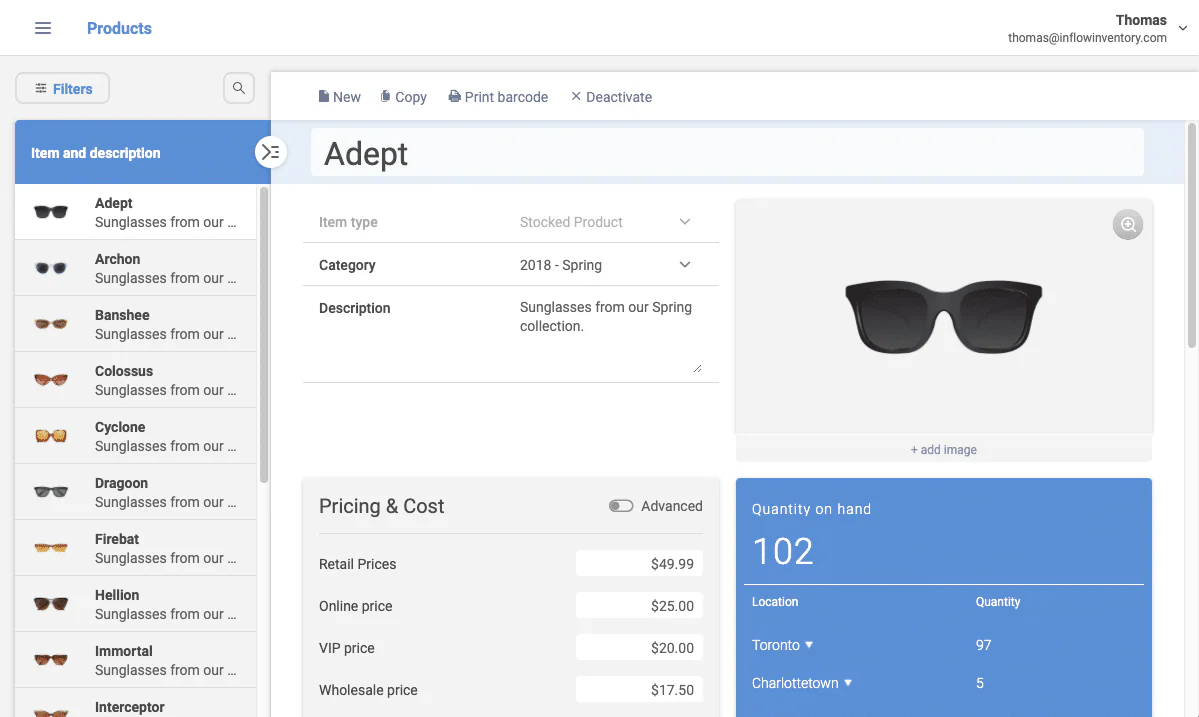
inFlow is an inventory management software that enables businesses to customize stock, reorder products, and manage sales and purchase orders. It helps companies maintain accurate inventory tracking across multiple platforms, so stock can be checked from anywhere.
In Malaysia, inFlow can be added through the Xero app marketplace. It focuses on stock and orders, so warehouse-heavy operations should also compare it with a dedicated warehouse management system.
Pricing and availability (checked October 2026): From USD 99/month (Lite, 1 location, billed annually); Core USD 299 (5 locations); Pro and Max cover unlimited locations. 14-day free trial.
| Pros | Cons |
|
|
|
|
|
Small teams that run stock from one location on the Lite plan, or up to five locations on Core. Pair it with your accounting tool for invoicing and tax.
13. ShipHero
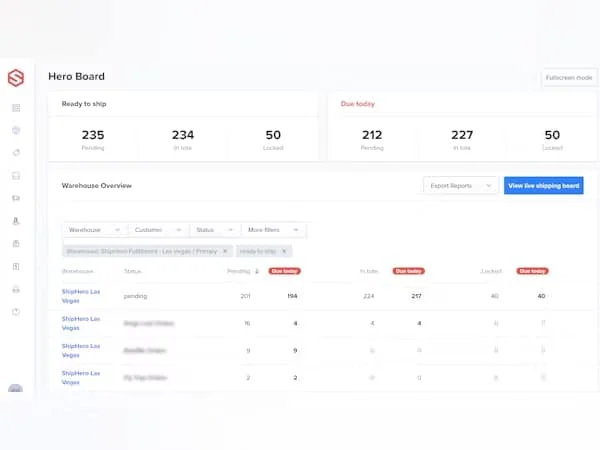
ShipHero is a cloud-based inventory system designed for e-commerce and fulfillment operations. It helps businesses streamline inventory management, track stock across multiple warehouses and sales channels, and simplify complex fulfillment processes for greater efficiency.
One of the standout features of ShipHero is its ability to facilitate efficient warehouse operations. The software supports businesses in maintaining a smooth flow of goods from receiving to shipping, minimizing the chances of errors and delays.
Pricing and availability (checked October 2026): ShipHero does not publish prices; third-party reviews report software plans of about USD 1,850 to 1,995/month. We found no Malaysian warehouse or reseller.
| Pros | Cons |
|
|
|
|
|
US e-commerce brands and 3PLs that need warehouse and fulfilment workflows. It is not a practical fit for Malaysian warehouses today.
14. Fishbowl
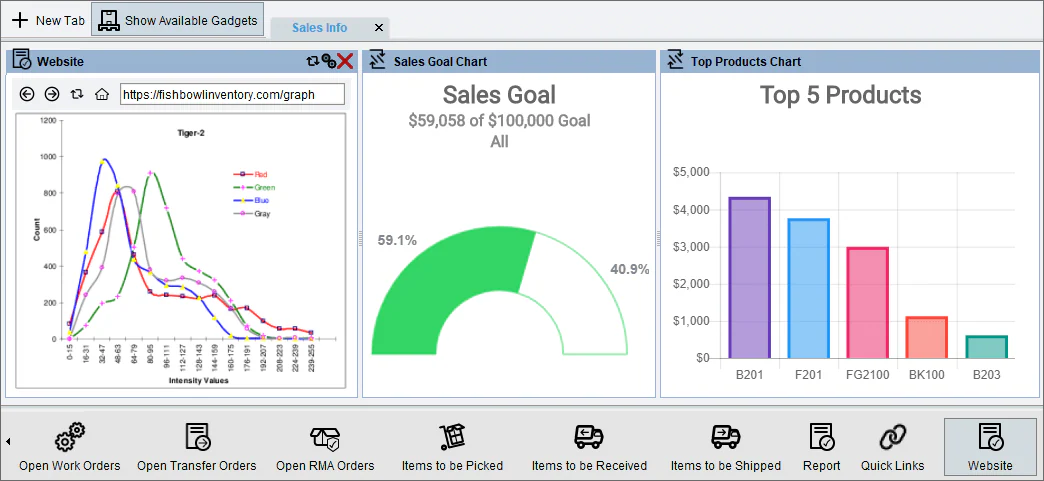
Fishbowl is an inventory management software that covers the entire inventory cycle, from ordering to reporting. It helps businesses maintain accurate records, optimize warehouse space, improve order fulfillment, and reduce manual data entry errors for greater efficiency.
Fishbowl provides the tools necessary to simplify complex operations, allowing businesses to focus on growth and customer satisfaction.
Pricing and availability (checked October 2026): Fishbowl Inventory from USD 229/month (Essentials, billed annually); Fishbowl Advanced is quoted. Fishbowl lists the US, Australia and the UK as its markets.
| Pros | Cons |
|
|
|
|
|
Small and mid-sized warehouses and manufacturers that track parts and finished goods from order to report, and that can work without a local Malaysian partner.
15. SQL Account
SQL Account is an accounting package from E Stream MSC, a Malaysian software company. Its stock features include multiple warehouses, multiple units of measure, barcode generation, serial number tracking, stock costing and reorder advice, with Stock Take and Production (MRP) sold as add-ons.
SQL Account Cloud lists LHDN e-invoice and SST compliance on both paid plans, and e-invoices can be submitted to LHDN in batches. Inventory tracking is only on the Pro plan.
Pricing and availability (checked October 2026): Essential RM79/month and Pro RM109/month (SQL Account Cloud), plus RM60 per additional user; free demo available. The SQL Einvoice add-on price is not published.
| Pros | Cons |
|
|
|
|
|
|
Malaysian SMEs that want accounting, SST and e-invoicing with stock control in one local package, and whose inventory needs are covered by the Pro plan.
16. Square
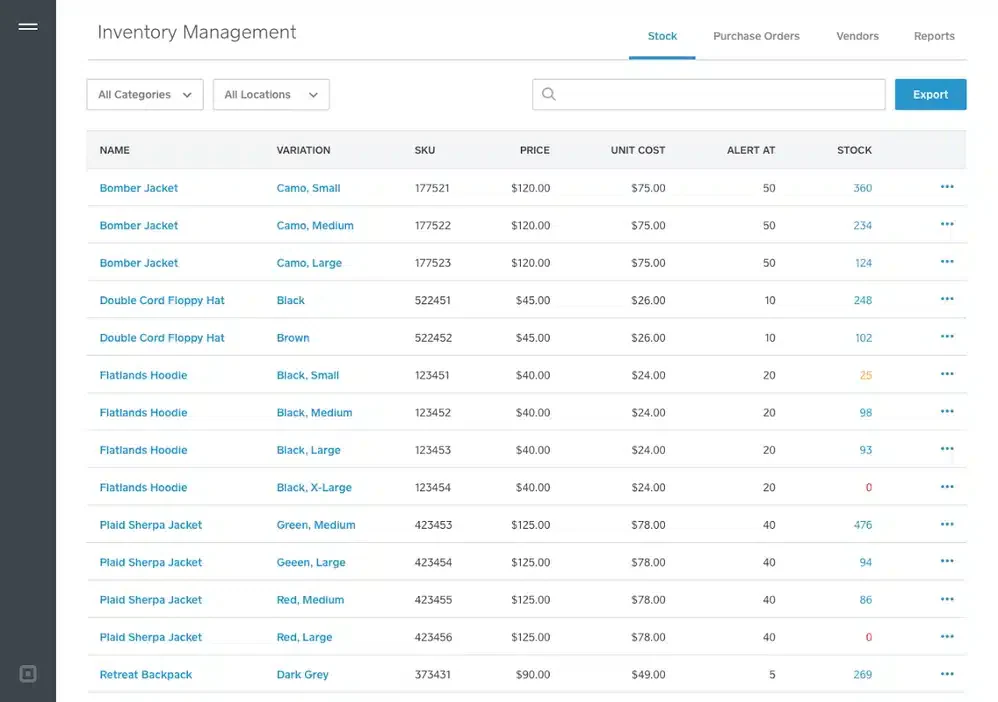 Square is a cloud-based point-of-sale system designed primarily for small and mid-sized retail businesses. It integrates payment processing, sales tracking, inventory management, customer relationship features, and multichannel selling (in-store + online) into one platform.
As part of Square’s ecosystem, the inventory management component enables you to track stock levels, set low-stock alerts, import item catalogs, and synchronize data between locations.
Note for Malaysian buyers: Square’s card payment processing is not available in Malaysia; Square lists card payments only for the US, Canada, Australia, Japan, the UK, Ireland, France and Spain. Confirm which features work on a Malaysian account before you shortlist it.
| Pros | Cons |
|
|
|
|
|
Retailers in countries where Square processes card payments. Malaysian retailers should look at a POS that is sold and supported locally.
17. Monday.com
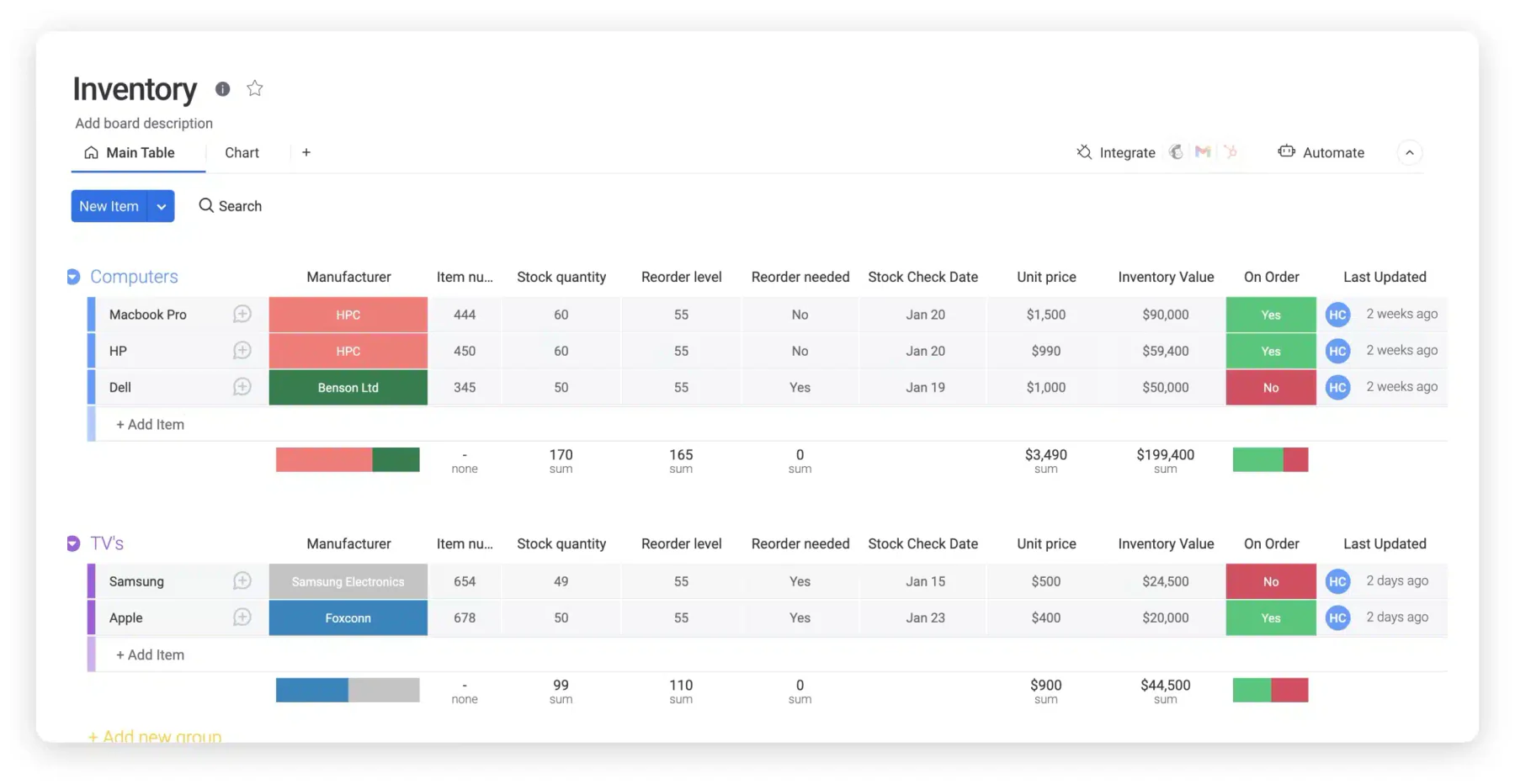
Monday.com is not strictly inventory software, but rather a work management platform that can be configured for stock management. Teams can create boards containing data such as stock quantity, unit price and last updated.
For inventory management, Monday.com’s workflows can be used to trigger alerts when stock levels start to run low. However, businesses still need to assess whether a board-based system like this is sufficient for more complex inventory workflows.
Pricing and availability (checked October 2026): Work management plans from USD 9 per seat per month (Basic, billed annually) with a three-seat minimum; a free plan covers up to two seats, and Pro has a 14-day trial.
| Pros | Cons |
|
|
|
|
|
Teams that want to track simple stock lists next to projects and tasks. It is a work management platform, not accounting-grade inventory software.
18. Spocket
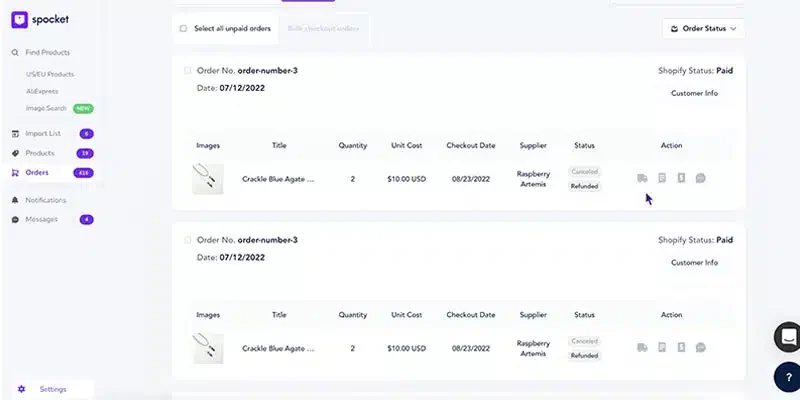 In a dropshipping model, stock is not always held by the retailer. Spocket addresses this by helping online shops source products from suppliers and ensuring that stock levels are kept up to date with the suppliers’ latest information.
Pricing and availability (checked October 2026): From USD 39.99/month (Starter); no free plan, 7-day free trial. Priced in USD, with suppliers mainly in the US and EU.
| Pros | Cons |
|---|---|
|
|
|
|
Online sellers who dropship from mainly US and EU suppliers and do not want to hold stock. It has no warehouse or accounting features.
19. Million
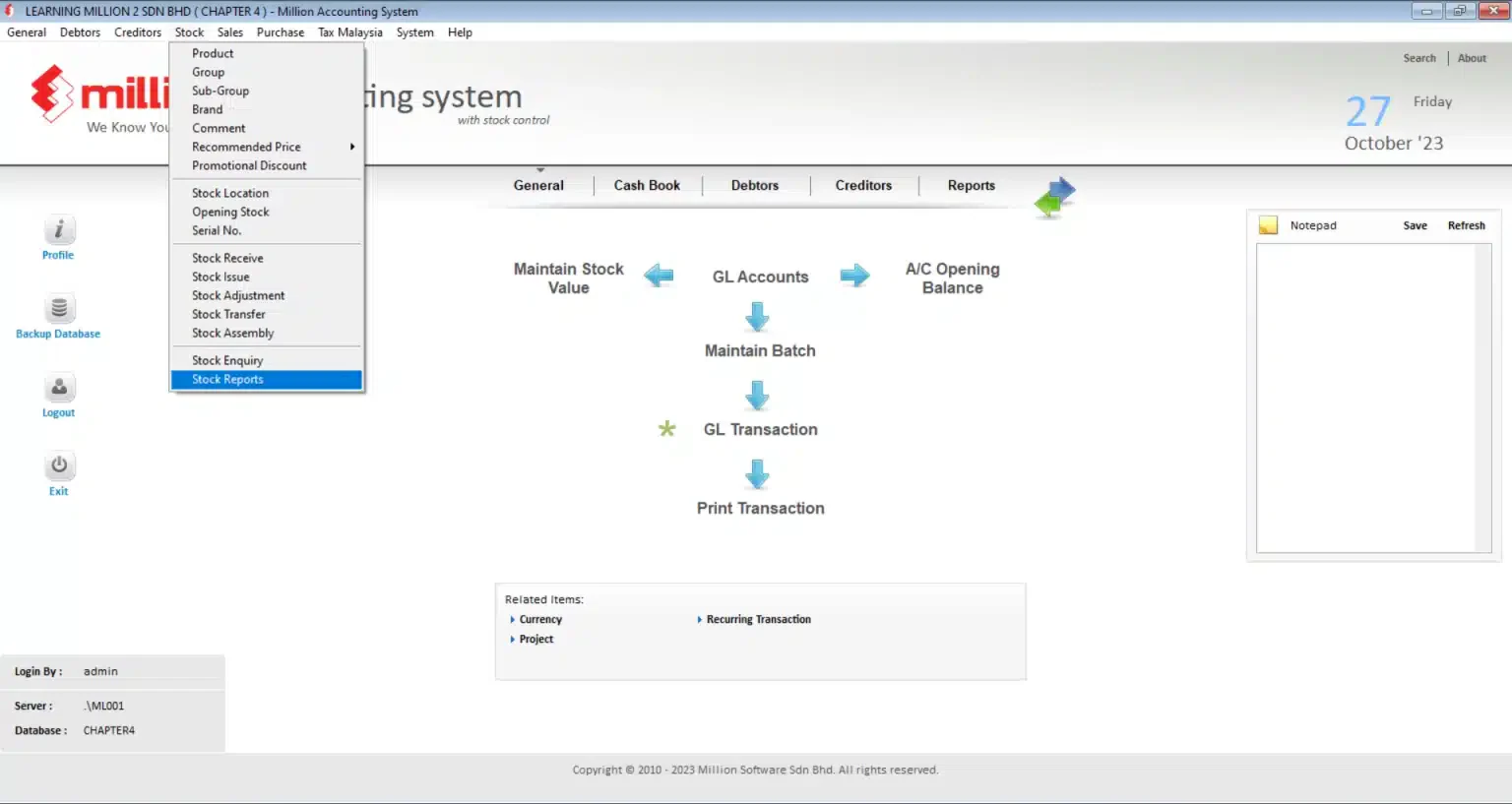 The Million Stock Control System is better suited to the needs of Malaysian SMEs that wish to keep their stock movements synchronised with their accounting or POS systems. To keep things concise, the discussion will focus on two main areas: cross-location tracking and integration with existing business systems.
Pricing and availability (checked October 2026): Third-party listings quote RM1,499 to RM2,099 depending on licence type; we could not confirm prices on Million’s own site, so ask the vendor for a quote.
| Pros | Cons |
|
|
|
|
|
Malaysian SMEs that already use Million accounting or POS and want stock control in the same product family on a desktop licence. Confirm MyInvois scope with the vendor.
20. Veeqo
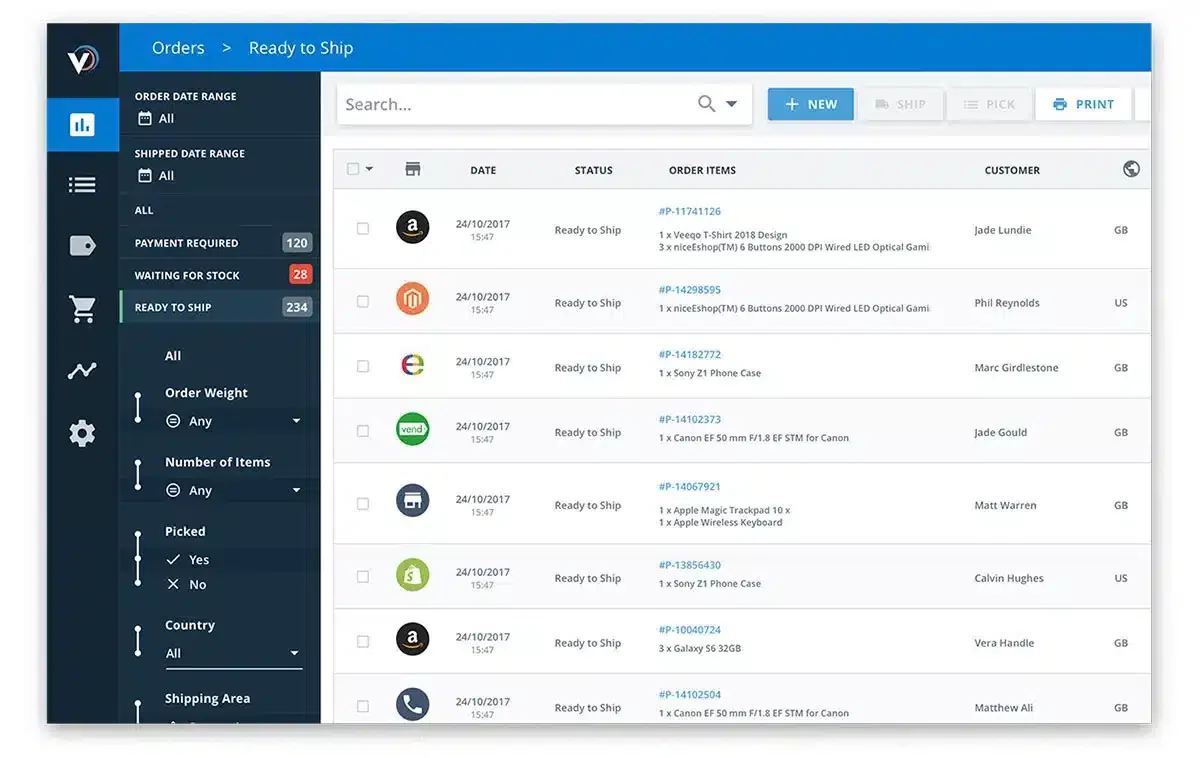
When a business sells via marketplaces, websites and physical shops simultaneously, stock levels can change faster than manual updates can keep up with. Veeqo operates in this multichannel environment, particularly where inventory needs to be linked to orders and shipping.
As its scope also extends to fulfilment, Veeqo is best described as a system for managing cross-channel stock, rather than simply a basic inventory tracking tool.
Pricing and availability (checked October 2026): Shipping features are free; inventory plans start from USD 19/month in the US. Veeqo’s pricing covers only the US and the UK, so it is not a verified option for Malaysian sellers.
| Pros | Cons |
|
|
|
|
|
Multichannel sellers in the US or UK who ship through Amazon, Shopify or eBay. Its pricing and carriers cover the US and UK only.
Overall Comparison of Inventory Management Software in Malaysia
The table below compares six of the platforms above based on their documented feature availability. Some capabilities may depend on the selected plan, edition, add-on, or third-party integration.
| Provider | Serial Number Tracking | Barcode & RFID Integration | Warehouse Management (WMS) | Inventory Valuation |
|---|---|---|---|---|
| HashMicro | Tracks serial numbers, lots, batches, expiry dates, and item movement from receiving to delivery. | Supports barcode and QR scanning, with RFID automation available for applicable warehouse configurations. | Manages receiving, putaway, transfers, stock counts, picking, packing, and dispatch. | Supports automated costing, landed-cost allocation, and consolidated valuation across locations. |
| Netsuite | Tracks serialized and lot-numbered items throughout inventory transactions. | Advanced barcode scanning is available through NetSuite WMS; native RFID support is not stated. | Dedicated WMS covers receiving, putaway, inventory processing, picking, packing, and shipping. | Supports average, FIFO, LIFO, specific, lot-numbered, and standard costing. |
| Zoho | Serial number tracking is available on selected pricing plans. | Supports barcode generation and scanning; native RFID support is not stated. | Provides multi-warehouse control and transfer orders, but not a dedicated advanced WMS. | Supports FIFO and weighted average costing, depending on the organisation’s configuration. |
| Netstock | Not available natively. | Not available natively. | Not available as a transactional WMS; it plans and optimises stock across locations using ERP data. | Not available as an accounting valuation engine; it displays inventory-value and investment insights from ERP data. |
| Monday | Not available natively; serial numbers must be maintained through custom fields. | QR-based workflows and custom integrations are possible, but barcode and RFID are not native inventory features. | Not available; inventory is managed through configurable boards and templates. | Calculates basic stock value using formulas and entered unit costs, not accounting valuation methods. |
| Quickbooks | Available in QuickBooks Desktop Enterprise with Advanced Inventory. | Barcode scanning is available in Advanced Inventory; RFID is not available natively. | Provides multi-site, bin, and pick-pack-ship functions, but not a full specialist WMS. | Supports FIFO or moving-average costing through Advanced Inventory. |
Features of Inventory Management Software
Whichever inventory management system you shortlist, check that it covers the features below and that its sales documents can feed your SST and e-invoicing process:
- Real-Time Inventory Tracking: Automatically updating stock levels whenever items are added, sold, or moved, giving businesses instant visibility into their inventory status.
- Order Management Capabilities: Automating the flow from order placement to fulfillment, synchronizing inventory, sales, and delivery data to ensure smooth and accurate processing.
- Sales and Purchase Order Processing: Integrates all order data into a single system, automatically tracking and updating each step from creation to fulfillment.
- Barcode Scanning and Automation: Using barcode readers to instantly capture product information and update inventory records in real time.
- Forecasting and Analytics Tools: Analyzing historical sales and inventory data to identify trends and generate predictive insights for future demand and stock optimization.
- Integration with Other Business Systems: Automatically synchronizing inventory data with POS, accounting, and e-commerce platforms to maintain consistent and up-to-date information across all operations.
With these features, businesses gain better stock movement visibility, reduce discrepancies between warehouses, and improve inventory turnover. Tools like ABC analysis help prioritize inventory based on value and movement, ensuring smarter replenishment planning.
What Happens If You Don’t Use Inventory Management Software?
Inventory management is a critical aspect of business operations that impacts efficiency and profitability. However, businesses often face common challenges in inventory management, including:
- Stock Shortages and Overstocking: Stock shortages occur when inventory doesn’t meet demand, leading to lost sales and reputational damage. Conversely, overstocking results in higher storage costs and increased risk of product damage, tying up capital that could be used elsewhere.
- Inaccurate Inventory Data: Inaccurate inventory data can severely disrupt business operations. Mismatches between inventory records and physical stock levels can lead to poor purchasing decisions and errors in sales orders.
- Long Delivery Times: Delays in supplier deliveries can disrupt the flow of goods and cause stock shortages. This issue is often exacerbated by supply chain uncertainties, poor communication with suppliers, and the difficulty in accurately predicting demand.
- Lack of Supply Chain Visibility: Limited visibility across the supply chain prevents businesses from quickly identifying and addressing issues. Without accurate, up-to-date information on inventory status, managing stock effectively becomes challenging.
- High Storage Costs: Excessive storage costs encompass warehouse rent, labor, insurance, and other expenses associated with maintaining inventory. These costs can rise when businesses overstock due to inefficient warehouse management.
Addressing these challenges requires implementing an effective inventory management system Malaysia, leveraging technology to enhance data accuracy, and adopting proactive supply chain management strategies. With these solutions, businesses can improve operational efficiency and achieve higher customer satisfaction.
How to Choose Best Inventory Management Software in Malaysia
When choosing the best inventory management system in Malaysia, several key factors should be considered to ensure optimal functionality and compatibility with local business practices. Make sure you don’t choose the wrong software that will increase your company’s losses.
Here are some tips on how to choose the best inventory management software Malaysia so that the system fits your company’s profile and workflow.
1. Identify your business needs: Start by knowing your business scale, customer reach, business work processes, and what obstacles you often experience. If you know your business problems, you will understand what type of inventory system you need.
2. MyInvois e-invoicing and SST: LHDN has phased in mandatory e-invoicing since August 2024. Since 1 September 2026, businesses with annual turnover below RM3 million are exempt, so companies at or above that level must issue e-invoices through MyInvois (see the LHDN implementation timeline). If your inventory system creates sales invoices, check whether it submits them to MyInvois through a direct API, through a partner, or only through your accounting software, and whether SST is calculated on the same documents.
3. Multi-currency support: Look for software that offers multi-currency support to facilitate international transactions, for your business in Malaysia to engage in global trade.
4. User-friendly interface: Prioritize a user-friendly interface to ease implementation and ongoing use, increase efficiency, and reduce training time for staff.
5. Strong customer support: Choose a software provider with reliable customer support services to address any issues promptly, minimizing downtime and ensuring smooth operations.
6. Integration capabilities: Evaluate integration options with other business management systems such as integrated business suite to smooth processes and improve overall efficiency.
7. Scalability: Opt for a software solution that is scalable to accommodate Malaysia’s growing business needs, allowing for smooth expansion without significant disruption.
8. Customization options: Look for software that offers customization options to tailor the system to the specific needs of the business, ensuring optimal functionality and flexibility.
By considering these factors, including how smart stock automation improves automation and forecasting, Malaysian businesses can find software that fits their needs and boosts efficiency.
To uncover the top-performing solutions, check out the full analysis in the conclusion below.
Which Inventory Software Suits Your Business?
| Business Scenario | Recommended Software | Why It Fits |
|---|---|---|
| SME that needs simple inventory tracking | Zoho Inventory / inFlow | These tools are easy to use and suitable for basic stock tracking, order management, and small team workflows without complexity. |
| Multichannel e-commerce seller | Ordoro / Cin7 | Order, shipping and stock control in one tool. Confirm that your Malaysian marketplaces, such as Shopee and Lazada, are supported before buying. |
| Business needing accounting + inventory in one system | Xero / QuickBooks / SQL Account | Combines bookkeeping with stock tracking. SQL Account lists LHDN e-invoice and SST on its paid plans; QuickBooks needs the Plus or Advanced plan for inventory. |
| Manufacturing or production-based company | Katana / Unleashed | Supports production workflows, BOM tracking, and inventory synchronization to prevent shortages and overstocking. |
| Growing business with multiple warehouses | HashMicro | Providesmulti-warehouse tracking, forecasting, barcode integration, and strong automation for scaling operations. |
| Enterprise with complex inventory operations | NetSuite | Advanced automation, reporting, and warehouse control make it suitable for large-scale inventory environments. |
| Business focused on demand forecasting | Netstock | Specialized in inventory forecasting and replenishment planning to optimize stock levels and reduce waste. |
| Retail business using a POS system | Million | Links stock control with Million’s own accounting and POS modules. Square is not an option for card payments in Malaysia. |
| Warehouse & fulfillment operations | ShipHero / Fishbowl | Warehouse and fulfilment workflows, but both are sold mainly in the US, Australia and the UK, so confirm local support first. |
| Dropshipping business | Spocket | Eliminates need for holding stock while syncing supplier inventory in real time to avoid overselling. |
| Local Malaysian SME | Million / SQL Account | Malaysian vendors with RM pricing. Confirm each product’s MyInvois scope with the vendor. |
| Custom workflow & flexible system needs | Monday.com | Highly customizable dashboards and workflows suitable for businesses needing adaptable inventory tracking. |
Conclusion
If your business only needs basic stock tracking, tools like QuickBooks, Zoho, or inFlow may be enough to manage daily inventory records without adding a complex system. For multichannel e-commerce, Ordoro and Cin7 focus on orders and shipping, but check their Malaysian marketplace support first. If you also need e-invoicing from the same system, look at tools with MyInvois built in or a confirmed integration, such as HashMicro, Odoo or SQL Account.
For companies managing multiple warehouses, purchasing flows, stock transfers, and accounting data, a more integrated system becomes easier to justify. In this case, HashMicro is worth considering because it connects inventory control with warehouse visibility, barcode tracking, forecasting, and local business requirements in Malaysia.
Before choosing a system, match the software with how your stock actually moves. A small retail shop does not need the same setup as a distributor with several warehouses. If your inventory process already affects fulfilment speed, purchasing accuracy, or financial reporting, a free consultation can help you confirm which setup fits before implementation begins.

FAQ about Inventory Management Software in Malaysia
Inventory management software focuses on stock levels, purchasing, replenishment, valuation, and product movement across locations. A warehouse management system provides more detailed warehouse workflows, including receiving, putaway, picking, packing, and dispatch. Businesses with complex warehouse operations may need both capabilities in one integrated system.
Before migration, businesses should clean and standardise product names, SKUs, units of measure, warehouse locations, supplier records, and opening stock balances. Batch, serial number, expiry-date, and inventory valuation data should also be checked before import. Conduct a physical stock count and test the migration with a small data sample before moving the complete inventory database.
Yes, the best inventory software should integrate with your POS or e-commerce store. Integration automatically syncs stock data, sales, and order information, ensuring your inventory levels are always up to date and reducing errors from manual entry.
There are four main types of inventory systems: the periodic system (updates stock at set times), the perpetual system (updates stock in real time), Just-in-Time (JIT) (minimizes stock levels), and ABC analysis (a method that ranks items by value, often used alongside the other three).
Costs usually fall into three buckets: (1) entry-level cloud tools with low monthly subscriptions (for example, Zoho Inventory starts at USD 29 per month billed annually and SQL Account Cloud Pro at RM109 per month), (2) mid-market systems that can run four figures in RM per month for more advanced workflows/integrations, and (3) enterprise/ERP-style inventory that’s typically quote-based and priced by modules, users, and rollout scope.
It depends on complexity: a basic cloud setup can be configured quickly, but a full implementation (data cleanup, item masters, workflows, training, integrations) is commonly planned in weeks, while larger ERP/NetSuite-style deployments often take months (e.g., 90 days for accelerated projects, or 6 months as a common estimate for many implementations).