










 Limited to 100 registrants
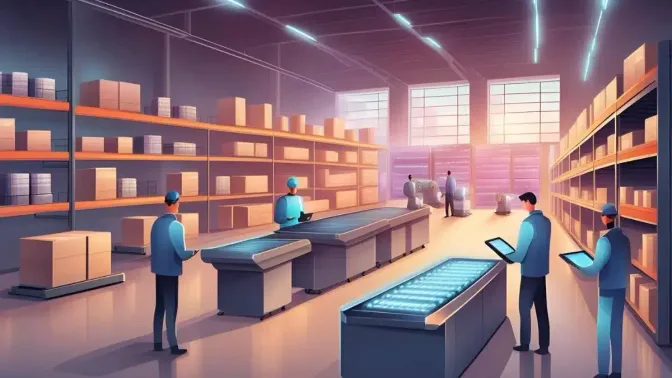
A Warehouse Management System (WMS) is essential for large logistics and supply chain businesses, helping manage key processes such as yard management, order processing, and inventory control. By automating receiving, picking, and shipping, a WMS improves operational accuracy and warehouse efficiency.
As Malaysia's warehouse sector continues to expand, the need for digital warehouse management is becoming increasingly important. According to Savills Research, Greater KL had 55.3 million sq ft of warehousing space in 1H2024, with an additional 11.28 million sq ft expected by 2027, highlighting the continued growth of the country's logistics industry.
To survive this shift, upgrading to a Modern Warehouse Management System is crucial to fix recurring inefficiencies that plague operations across industries, many of which go undetected until they significantly impact profitability.
Key Takeaways
Managing warehousing and distribution tasks is challenging for large logistics businesses, especially with manual methods prone to errors.
A Warehouse Management System (WMS) solves these issues by automating and optimizing processes and improving inventory accuracy.
Choosing the right WMS is crucial for enhancing productivity and competitiveness.
What is WMS (Warehouse Management System)
A Warehouse Management System (WMS) is software that controls and optimises every aspect of daily warehouse operations. From the moment goods arrive at your loading dock to the second they’re shipped to customers, a WMS tracks, manages, and improves each step.
Think of it as the central nervous system of your warehouse. It connects inventory data, worker activities, equipment usage, and shipping schedules into one unified platform. Rather than juggling spreadsheets, manual counts, and guesswork, warehouse managers get real-time visibility into what’s happening across their entire operation.
Most WMS platforms integrate with other business systems like ERP (Enterprise Resource Planning), TMS (Transportation Management Systems) for business, and e-commerce platforms. This integration creates a seamless flow of information across your entire supply chain.
How Does a Warehouse Management System (WMS) Work?
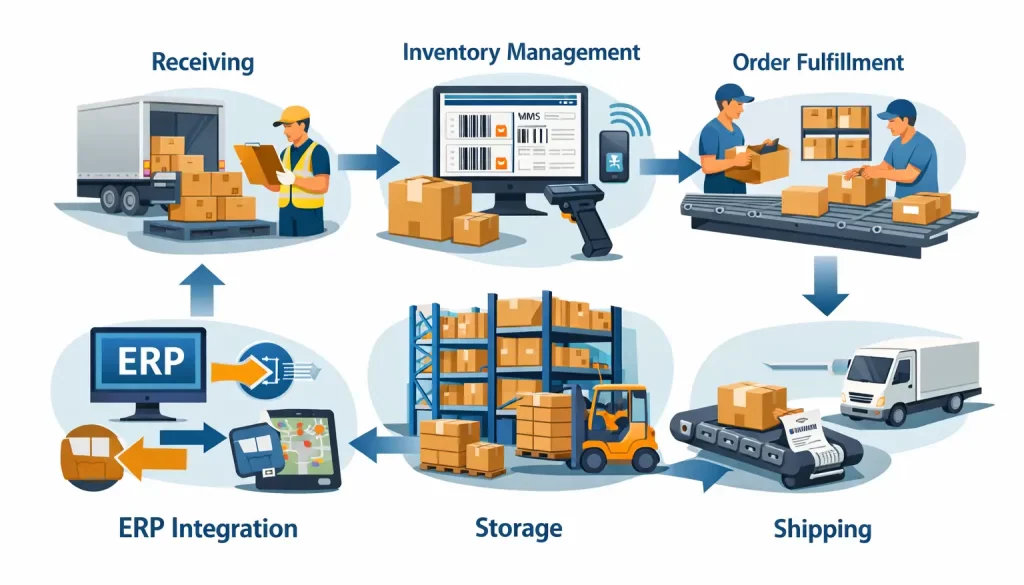 WMS operates through several interconnected processes that work together to streamline warehouse operations.
Usually there’s been a debate between ERP system and WMS, but in reality WMS integrates with other business systems such as Enterprise Resource Planning (ERP) and transportation management software to create a seamless supply chain process. In Malaysia, this integration helps businesses align multi-channel sales with logistics operations while keeping data accurate across platforms.
Receiving and Put-Away
When inventory arrives, the WMS takes over immediately. It validates incoming shipments against purchase orders, records quantities and conditions, then determines the best storage location based on factors like product type, demand frequency, and warehouse layout.
Modern systems use barcode scanning or RFID to automate this process. A worker scans an item, and the WMS instantly tells them exactly where to store it no guessing, no wasted time walking around looking for space. This guidance is only possible when the warehouse has a well-structured rack and slot addressing system that the WMS can reference in real time.
Inventory Tracking
The system maintains real-time visibility into every item’s location and status. Using automatic identification technology (AIDC) like barcodes or RFID tags, it tracks products as they move through the warehouse.
This tracking enables cycle counting (regularly auditing portions of inventory rather than shutting down for annual counts), demand forecasting, and alerts when stock levels hit reorder points.
Order Processing and Picking
When orders come in, the WMS prioritizes them based on shipping deadlines, customer importance, or other criteria you set. It then creates optimized pick lists that guide workers through the warehouse using the most efficient routes.
Some systems support advanced picking methods:
- Wave picking: Grouping multiple orders for simultaneous processing
- Batch picking: Collecting items for several orders in one trip
- Zone picking: Assigning workers to specific warehouse areas
- Pick-to-light: Using lights to guide workers to correct locations
Packing and Shipping
After picking, the WMS verifies items against orders, suggests appropriate packaging, generates shipping labels, and selects optimal carriers. Real-time tracking ensures you can monitor packages until they reach customers.
Performance Analytics
Throughout these processes, the WMS collects data on everything with picking accuracy, labor productivity, order cycle times, inventory turns. This data powers reports and dashboards that help managers identify bottlenecks and improvement opportunities.
Hashy AI Fact

Hashy AI helps warehouse teams predict stock needs, optimize picking routes, and flag issues in real time, so every shipment moves faster with fewer errors.
Request a free demo today!
How to Use WMS?
A Warehouse Management System (WMS) streamlines warehouse operations, making inventory management more efficient. Here’s how to use WMS it effectively:
- System Setup and Integration: Start by configuring the WMS to fit business needs. This includes setting up warehouse zones, product categories, and integrating it with ERP and supply chain software for seamless operations.
- Inventory Data Input and Tracking: Input product details, stock levels, and storage locations into the system. Using barcode scanners or RFID helps warehouse automate tracking, ensuring real-time visibility and reducing errors.
- Receiving and Storage Optimization: When stock arrives, WMS records the data instantly and suggests the best storage locations. This ensures efficient space utilization and faster product retrieval.
- Order Processing and Picking: The system prioritizes orders and provides picking instructions to warehouse staff. Optimized routes reduce picking time, improve accuracy, and speed up fulfillment.
- Packing and Shipping Management: After picking, the WMS verifies items, generates shipping labels, and selects the best carriers. It also tracks shipments in real-time, ensuring smooth deliveries.
- Performance Monitoring and Reporting: Warehouse Management System (WMS) provides real-time analytics on stock levels, order accuracy, and warehouse efficiency. Businesses can use this data to refine processes and improve productivity.
- System Maintenance and Adjustments: Regularly updating Warehouse Management System (WMS) settings based on demand changes helps maintain efficiency. Reviewing reports and adjusting workflows ensures optimal warehouse performance.
By following these steps, businesses can maximize WMS benefits, reducing errors and improving overall warehouse efficiency.
"A WMS isn't just about tracking boxes, it’s about mastering flow. By digitizing the warehouse, you transform manual bottlenecks into a high-speed, error-free fulfillment engine."
How a WMS Integrates into the Broader Supply Chain
A powerful Warehouse Management System (WMS) does much more than organize a physical storage facility; it acts as an engine that drives efficiency across the entire supply chain network. By delivering deep inventory analytics and demand forecasting, the right software empowers businesses to evaluate:
- Profitability at the SKU level: This critical metric helps decision-makers identify exactly which high-margin items should be prioritized for reordering, while flagging underperforming inventory that needs to be phased out of the catalog.
- SKU velocity: Understanding the precise speed at which products move enables businesses to calculate the optimal reorder quantities. This ensures a perfect balance between securing bulk-order discounts from suppliers and maintaining a healthy inventory turnover rate.
- Customer distribution and average Time in Transit (TNT): Analyzing delivery data can reveal significant optimization opportunities. For example, if a business discovers that most of its customers are located in Northern Malaysia but its goods are imported through Port Klang, it may choose to route future shipments through Penang Port instead, reducing transit time and lowering transportation costs.
Ultimately, integrating a WMS not only slashes operational costs and accelerates fulfillment speed, but it also gives businesses the agility needed to consistently meet customer demands while keeping inventory perfectly optimized.
6 Benefits of Using a Warehouse Management System

1. Increased efficiency
A WMS enhances the efficiency of warehouse and logistics operations by streamlining the movement of goods, which improves every step of the fulfillment process with better efficiency, consistency, and quality control.
According to a Logistics Magazine survey, the warehouse is the most commonly cited place for packing and fulfillment activities. Moreover, ResearchGate estimates that order picking accounts for 55% of the total cost of warehousing.
Therefore, a WMS helps increase productivity by optimizing warehouse layout, ensuring easy access to product locations, maximizing space utilization, improving workflow to prevent bottlenecks, and reducing floor traffic.
Additionally, warehouse management improves efficiency by maintaining precise activity records, which assist warehouse staff in picking, packing, and dispatching merchandise. Knowing what to do next in the order process allows workers to accomplish more in less time.
2. Improved accuracy
WMS integrates all warehouse functions such as inventory movement, invoicing, loading, and delivery into a single system.
It ensures precise tracking of inventory, accurate invoicing, and smooth order fulfillment. Integrated or third-party invoicing tools help track supplier transactions and manage payments efficiently.
3. Improved Labor Management
A WMS strengthens workforce management by helping businesses forecast labor needs, plan schedules, and assign tasks based on employee skills, proximity, and workload. It also reduces unnecessary travel time inside the warehouse, enabling teams to work more efficiently and maintain consistent output.
Beyond efficiency, a well-implemented WMS also contributes to a safer and more organized work environment. With clearer workflows and fewer manual steps, employees can focus on higher-value tasks, leading to better morale and a more productive warehouse operation overall.
4. Enhanced visibility
Provides real-time insights into inventory levels, item movements, and order status. Connections to e-commerce platforms allow online payment processing and give a better overview of warehouse operations, improving decision-making and responsiveness.
5. Reduced costs
A significant benefit of a Warehouse Management System (WMS) is cost reduction. It offers effective inventory protection technology to prevent lost and stolen products. You can minimize waste, theft, and costs by closely monitoring the items entering and leaving your warehouse.
A WMS also reduces energy expenditures by automatically controlling lighting, turning lights on only when needed, and saving energy costs. Companies can reduce their operating expenses by up to 30% through optimized space utilization and improved inventory management.
6. Better customer service
Enables faster and more accurate order fulfillment. Real-time inventory tracking, FIFO enforcement, and organized warehouse slotting help prevent stockouts, expired products, or overstocking, resulting in a smoother experience for customers.
A cold storage solution helps business to maintain product integrity and extend shelf life, reducing spoilage and financial loss.
Strategic inventory slotting further enhances efficiency by organizing inventory based on turnover, expiration, and demand to improve stock rotation and reduce waste.
This is especially useful for businesses handling perishables, thanks to real-time updates, analytics, and clear KPIs.
Types of Warehouse Management System (WMS)
There are three primary types of Warehouse Management System (WMS) software: standalone systems (on-premise and often custom-built legacy systems), cloud-based solutions, and WMS applications integrated into ERP or supply chain management platforms (either on-premise or cloud-hosted). Each type has its benefits and drawbacks, so the best choice will vary by business needs.
1. Standalone WMS
A dedicated system focused solely on managing warehouse operations without any external integration. Standalone WMS handles core warehousing functions, such as receiving, storage, picking, packing, and shipping as an independent software solution.
Best for: Small to mid-sized businesses with straightforward warehouse operations, companies just starting their digital transformation journey, or organizations that prefer to keep warehouse management separate from other business systems.
Considerations: Limited visibility into broader business operations, may require manual data transfer to other systems (accounting, sales, etc.), and can create data silos if not properly managed.
2. Cloud WMS
Cloud-based WMS solutions are quickly deployable and have lower upfront costs. As software-as-a-service (SaaS), cloud data warehouse for supply chain visibility offer flexibility to accommodate seasonal and market changes and are easier to scale with business growth.
Best for: Growing businesses wanting flexibility, companies without large IT departments, operations with seasonal volume fluctuations, or organizations prioritizing rapid deployment.
Considerations: Requires reliable internet connectivity, ongoing subscription costs, and you’re dependent on the vendor for updates and uptime.
3. Integrated ERP and SCM-based WMS
These systems come as modules within larger Enterprise Resource Planning platforms, connecting warehouse operations directly to accounting, procurement, sales, and other business functions.
Best for: Organizations already using ERP systems who want seamless data flow across departments, or those seeking a single vendor for all business software.
Considerations: May offer less specialized warehouse functionality than dedicated WMS, and you’re locked into the ERP vendor’s ecosystem.
4. On-Premise WMS
A system installed and hosted locally within your company’s own infrastructure. The software runs on your servers, managed by your IT team, giving you complete control over the system and data.
Best for: Large enterprises with strong IT teams, strict security or compliance needs, highly customized workflows, or operations in areas with unstable internet access.
Considerations: High upfront costs for licenses, hardware, and implementation, ongoing expenses for maintenance and IT resources, longer deployment timelines, and increasing integration challenges with newer cloud technologies over time.
Pros and Cons of Cloud-Based Warehouse Management System (WMS)
Here is a table summary that discusses about pros and cons of cloud-based warehouse management system
| Pros | Description |
|---|---|
| Faster implementation | Cloud-based WMS can be deployed in weeks, enabling quicker ROI compared to traditional on-premises systems. |
| Fewer upgrade hassles | SaaS vendors handle updates automatically, keeping organizations on the latest version with minimal effort. |
| Lower costs | Cloud-based warehouse storage systems are more affordable because they remove hardware, installation, and IT maintenance costs. Vendors handle updates, while on-premises upgrades remain expensive. |
| Scalability | Cloud-based WMS can easily adjust to business growth and changing supply chain needs. |
| Cons | Description |
| Long-term costs | Subscription fees can add up over time, and extra charges may apply for new features or premium support. |
| Customization | SaaS WMS often has limited customization options, making it costly for businesses with highly specific workflows. |
| Updates and patching | Regular system updates may require process adjustments and occasional employee retraining. |
The market trend: Cloud-based WMS platforms captured 55.61% of the market in 2024 and are growing at a 19.68% annual rate (Mordor Intelligence). For many Malaysian businesses especially SMEs preferring lower entry costs and flexible scaling, cloud solutions offer the most practical path to modernization.
Who Uses Warehouse Management System (WMS) Technology?
Warehouse Management System (WMS) technology is essential for businesses that rely on efficient warehouse operations to manage large volumes of inventory and streamline distribution processes. It is used by various industries to ensure smooth operations, reduce errors, and increase efficiency. Here are some of the key users of WMS technology:
- Retailers: To manage stock levels, process orders, and ensure timely deliveries across multiple locations.
- E-commerce Companies: For fast and efficient order fulfillment, real-time inventory tracking, and seamless customer experiences.
- Manufacturers: To manage raw materials, finished goods, and streamline production and distribution processes.
- Wholesalers and Distributors: To track inventory and optimize the movement of goods across warehouses and distribution centers.
- Third-Party Logistics Providers (3PLs): For warehousing, shipping, and distribution services for clients, ensuring efficiency in fulfillment processes.
- Supply Chain Managers: To improve operational efficiency, integrate systems, and enhance coordination between warehousing and other business functions.
Overall, any business that manages inventory, warehousing, or distribution can benefit from WMS technology to optimize operations and enhance supply chain efficiency.
Key Features to Look in a WMS

A Warehouse Management System (WMS) offers a range of features designed to enhance efficiency and accuracy in warehouse operations. Here are the key features of WMS software:
- Warehouse Design and Inventory Tracking: A Warehouse Management System (WMS) allows organizations to customize workflows and optimize inventory allocation and movement. It utilizes advanced tracking systems, such as RFID and barcode scanners, to ensure goods are easily located when needed. Features like bin slotting maximize storage space and adapt to seasonal changes.
- Receiving, Storage, and Picking: The system facilitates efficient storage, retrieval, and picking of goods using technologies such as pick-to-light or pick-to-voice. It supports various picking methods, including zone picking, batch picking, and wave picking, and optimizes tasks to enhance efficiency.con
- Shipping and Yard Management: Warehouse management software streamlines shipping processes by generating necessary documents, like bills of lading and packing lists, and notifying recipients of upcoming shipments. It also helps manage yard and dock operations, ensuring smooth coordination of incoming and outgoing shipments.
- Labor Management and Reporting: The system monitors worker performance through key performance indicators (KPIs), helping managers identify areas of improvement. Additionally, it provides detailed reports on warehouse operations to guide decision-making and enhance overall productivity.
Getting Started with WMS Implementation
Implementing a WMS is a significant project, but proper planning sets you up for success.
Phase 1: Preparation
- Document current processes and identify improvement opportunities
- Clean up inventory data (garbage in, garbage out applies here)
- Define success metrics you’ll use to measure the implementation
- Build your project team with representatives from operations, IT, and management
Phase 2: Configuration
- Set up warehouse zones, locations, and storage types
- Configure workflows for receiving, put-away, picking, and shipping
- Establish user roles and permissions
- Build integrations with other systems
Phase 3: Testing
- Verify all configurations work as expected
- Test integrations thoroughly
- Run parallel operations (old and new systems simultaneously) if possible
- Train all users before go-live
Phase 4: Go-Live and Optimization
- Start with a manageable scope (perhaps one product line or zone)
- Monitor closely and address issues quickly
- Gather user feedback and refine processes
- Gradually expand to full operations
Study Case: Overcoming Operational Bottlenecks with WMS Integration
CJ Century Logistics, a prominent 3PL provider in Port Klang, faced significant challenges managing diverse multi-client SKUs. Before modernizing, manual spreadsheets led to 22% inventory inaccuracies and 30% labor waste due to inefficient picking routes. These issues resulted in frequent shipping delays and fragmented ERP connectivity, typical of traditional warehouse management hurdles.
To resolve these bottlenecks, the firm deployed a cloud-based Warehouse Management System (WMS) integrated with their ERP and TMS. The rollout involved rigorous inventory data cleansing, strategic bin location management, and a phased implementation starting with inbound workflows. Key upgrades included real-time RFID tracking and labor management dashboards to improve shift coordination.
Within six months, inventory accuracy surged from 78% to 98% while fulfillment time was slashed by 60%. Labor productivity soared by 108%, increasing from 120 to 250 picks per hour and saving RM 1.2M annually. This transition demonstrates a rapid ROI for Malaysian 3PLs navigating the competitive e-commerce landscape through AI-driven forecasting.
The Future of Warehouse Management: Emerging Technologies

The WMS market isn’t standing still. Several technologies are reshaping what’s possible in warehouse operations.
1. Artificial Intelligence and Machine Learning
AI-powered WMS platforms are moving beyond simple tracking to predictive operations. Machine learning algorithms can:
- Forecast demand spikes and automatically adjust inventory levels
- Optimize slotting by learning which products are frequently ordered together
- Predict equipment maintenance needs before breakdowns occur
- Dynamically adjust picking strategies based on real-time conditions
According to Expert Market Research (2025), 57% of logistics firms globally plan to adopt smart warehouse solutions by 2030.
2. Robotics and Automation
Autonomous Mobile Robots (AMRs) are increasingly common in high-volume warehouses. These robots can:
- Transport goods between locations without human intervention
- Assist pickers by bringing shelves to workers (goods-to-person)
- Handle repetitive tasks like palletizing and sorting
For Malaysian operations, retailers like MR DIY have reported 200% efficiency gains after installing robotic systems.
3. Voice-Directed Warehousing
Voice picking technology allows workers to receive instructions through headsets and confirm actions verbally. This keeps hands and eyes free for work, improving both speed and accuracy. It’s particularly effective in cold storage environments where screens can fog and touchscreens don’t work well with gloves.
4. Internet of Things (IoT)
Connected sensors throughout the warehouse provide data on everything from equipment status to environmental conditions. IoT enables:
- Real-time temperature monitoring for cold chain compliance
- Automated alerts when equipment needs attention
- Energy management to reduce utility costs
- Enhanced security monitoring
5. Augmented Reality (AR)
AR wearables can display picking instructions, navigation guidance, and item information directly in workers’ field of vision. While still emerging, this technology promises significant productivity improvements for complex picking operations.
Top Warehouse Management Vendors
Several major enterprise software providers deliver the best WMS platforms either as standalone products or as embedded modules within comprehensive ERP suites. These include the following:
-
Microsoft: Renowned for its Dynamics 365 suite, it offers smooth integration with the broader Microsoft ecosystem and leverages strong AI-driven supply chain forecasting.
-
HashMicro: Delivers a highly customizable and localized system integrated with AI-powered business applications, making it an agile and pragmatic choice for scaling businesses that need robust inventory tracking without the massive implementation timeline of traditional legacy software.
-
Oracle: Provides an enterprise-grade, cloud-native solution that excels in handling highly complex, high-volume global fulfillment networks with advanced real-time analytics.
-
SAP: The historical industry standard for massive multinational corporations, offering unparalleled depth in automated logistics process control and strict global standardization.
While these massive enterprise vendors offer incredibly powerful capabilities, choosing the right software ultimately depends on , operational size, and regional footprint. If your facilities are based in the region and you want a solution specifically tailored to local supply chain nuances,support requirements, and the system is reasonable priced.
Conclusion
Warehouse Management System isn’t just software, it’s a strategic investment in operational excellence. In an era where customers expect fast, accurate fulfilment and competition intensifies daily, running a warehouse without WMS is like competing in a race with one shoe.
The technology has matured, cloud options have made it accessible to businesses of all sizes, and the ROI case is clear. Whether you’re a growing e-commerce seller struggling with inventory accuracy, a manufacturer seeking better production-to-shipment flow, or a 3PL provider managing multiple clients, there’s a WMS solution that fits your needs.
The Malaysian market is ready with logistics infrastructure valued at nearly USD 30 billion and e-commerce continuing its rapid growth, the businesses that invest in warehouse technology now will be the ones capturing market share tomorrow. Experience the boost in productivity firsthand with a free demo of WMS today!

FAQ about Warehouse Management System (WMS)
Warehouse Management System stands for Warehouse Management System. It is a software solution that helps businesses manage and control warehouse operations, including inventory tracking, order processing, picking, packing, and shipping.
Standalone: A dedicated system focused solely on managing warehouse operations without any external integration. Integrated: A system that integrates with other business systems, such as ERP or SCM, for seamless data flow across different functions. Cloud-based: A web-based solution hosted on the cloud, offering flexibility, scalability, and remote access. On-premise: A system that is hosted and managed locally within a company’s infrastructure, providing full control but requiring higher maintenance costs.
A Warehouse Management System (WMS) is used by businesses involved in managing inventory, warehousing, and distribution. This includes a wide range of industries, such as retailers, manufacturers, third-party logistics providers (3PLs), e-commerce companies, wholesalers, distributors, and supply chain managers.
No, a WMS is not the same as an ERP system. While both are critical for business operations, WMS is focused solely on managing warehouse tasks, whereas ERP integrates various business functions such as finance, HR, supply chain, and more. WMS can be part of an ERP system, but it serves different purposes.