


 Limited to 100 registrants

Tracking every peso by hand gets risky fast, especially when receipts pile up and no one is sure which account each payment belongs to. A ledger account solves that problem by giving every asset, liability, income, and expense item its own running record, so you always know where the money sits.
According to the Bureau of Internal Revenue, every registered taxpayer in the Philippines must keep books of accounts and preserve them for ten years, which makes a clean ledger a compliance requirement and not just good housekeeping. Getting this right starts with a clear ledger sample and a reliable ledger template you can reuse every period.
This guide walks through what a ledger account is, the types businesses use, a worked example, and the six steps to prepare a ledger for accounting. Accounting software can automate the same workflow once your volume grows, and a free downloadable template is included at the end.
Key Takeaways
A ledger account is the running record of every debit and credit posted to one specific account, and it feeds directly into your financial statements.
General, subsidiary, debtors, and creditors ledgers each track a different slice of your finances.
Six steps take you from listing active accounts to transferring balances into the financial statements.
A ready-to-use ledger template lets you record opening balances and running totals without building a spreadsheet from scratch.
What is a Ledger Account?

A ledger account is a single record that collects every debit and credit affecting one account, such as Cash, Accounts Receivable, or Sales. Each account carries its own page or row in the ledger, complete with a date, a description, the amounts posted, and a running balance.
Its role in accounting is to sit between the journal and the financial statements. Transactions are first captured in a journal in date order, then posted to the matching ledger account so that activity is grouped by account instead of by date. Without that step, you would have a list of events but no balance per account.
The full set of ledger accounts forms the general ledger, which is the backbone of any accounting system. Once every account carries a correct balance, the trial balance, balance sheet, and income statement can be built straight from it.
Functions of a Ledger
Ledgers give financial data a structure that raw journals cannot provide. They turn a stream of entries into account-level balances that finance teams can review, reconcile, and report on.
- Summarizing financial data: Ledgers consolidate entries from general journals and specialized credit sales transaction records, creating a single reference point for reviewing account activity within a specific period.
- Classifying transactions: Grouping entries by account shows the current position of assets, liabilities, and equity at any point in the period.
- Providing a basis for financial statements: Organized balances make it far faster to compile a balance sheet or an income statement.
- Supporting automated reporting: Automated systems read ledger balances to produce real-time reports, which matters most for businesses with high transaction volumes.
Those four functions explain why the ledger is where most reporting errors are caught. If a balance looks wrong on a report, the ledger account is the first place to trace it back.

Types of Ledgers
Effectively managing financial records starts with understanding the different types of ledgers. Each type serves a unique purpose, offering insights into various financial aspects of a business. Here are the main types of general ledger:
| Types | Definition |
| General Ledger | Records all financial transactions over a set period. It includes accounts like cash, receivables, and expenses for a broad financial view. |
| Subsidiary Ledger | Provides detailed records for specific transactions, such as receivables or payables. It extends the general ledger for closer transaction tracking. |
| Debtors Ledger | Tracks debts owed by customers to the business. It shows customer balances to monitor credit sales. |
| Creditors Ledger | Monitors amounts owed to suppliers. It lists suppliers offering credit, aiding in managing obligations effectively. |
Running these ledgers side by side keeps the summary view and the transaction detail in agreement. When period-end arrives, the same structure also makes it easier to identify the adjusting journal entries needed before the books are closed.
Example of Ledger
Creating a ledger requires familiarity with the Chart of Accounts (CoA). Each account in the general ledger is assigned a unique identifier, making it easier to track and update.
Example of a Chart of Accounts (CoA)
| Account Number | Account Type | Description |
|---|---|---|
| 1xxx | Assets | includes cash, receivables, inventory, etc. |
| 2xxx | Liabilities | includes accounts payable, loans, etc. |
Using T-Accounts in Ledger Accounting
A T-account format helps visualize the balance and activity within each account. For instance, a cash account under a T-account setup displays increases and decreases, helping businesses easily track cash flow.
| Date | Description | Debit (₱) | Credit (₱) | Balance (₱) |
|---|---|---|---|---|
| Dec 1 | Opening Balance | 0 | 0 | 0 |
| Dec 15 | Payment Received | 4,000,000 | 0 | 4,000,000 |
| Dec 31 | Cash Sale | 2,000,000 | 0 | 2,000,000 |
Sample General Ledger Entry
Consider the following transactions for Aksara Gemilang, Inc.:
- Sales on Credit: On December 1, 2020, Aksara Gemilang, Inc. sold goods on credit worth Php 4,000,000 and Php 3,500,000 to two different customers.
- Purchase on Credit: On December 5, 2020, Aksara Gemilang, Inc. purchased office supplies on credit for Php 1,500,000.
- Payment Received: By December 15, Aksara Gemilang, Inc. received a repayment of Php 4,000,000 from the first customer.
- Cash Sale: On December 31, 2020, Aksara Gemilang, Inc. made a cash sale worth Php 2,000,000.
The example would be:
| Date | Transaction Type | Descriptions | Debit (₱) | Credit (₱) |
|---|---|---|---|---|
| Dec 1, 2020 | Sales on Credit | Sold goods on credit to Customer 1 | 4,000,000 | - |
| Dec 1, 2020 | Sales on Credit | Sold goods on credit to Customer 2 | 3,500,000 | - |
| Dec 5, 2020 | Purchase on Credit | Bought office supplies on credit | - | 1,500,000 |
| Dec 15, 2020 | Payment Received | Customer 1 repayment | - | 4,000,000 |
| Dec 31, 2020 | Cash Sale | Cash Sale to third customer | 2,000,000 | - |
Posted this way, every peso appears twice, once as a debit and once as a credit, and each account carries its own closing balance. Businesses that outgrow manual posting usually move this work into accounting software in the Philippines so the ledger updates the moment a transaction is recorded.
How to Prepare Ledger for Accounting
Preparing a ledger follows the same six steps whether you use a spreadsheet or a full accounting system.
1. Identify All Active Accounts
List every account your business actually uses this period, drawn from your Chart of Accounts. Dormant accounts only add noise, so keep the list to accounts with real activity or a standing balance.
2. Record the Opening Balances
Carry forward the closing balance of each account from the previous period. Asset and expense accounts open on the debit side, while liability, equity, and income accounts open on the credit side.
3. Post Journal Entries to the Ledger
Transfer each journal entry to its matching ledger account, keeping the original date and reference number. Posting in chronological order makes later tracing far easier when a figure needs checking.
4. Calculate the Running Balance After Each Entry
Update the balance line by line instead of only at period-end. A running balance exposes an error in the same week it happens rather than a month later.
5. Reconcile the Ledger at Period-End
Match each ledger balance against its supporting record, such as the bank statement for Cash or the aging report for Receivables. Any gap must be resolved before a trial balance is prepared.
6 Transfer Balances to Financial Statements
Move the final balances into the trial balance, then into the balance sheet and income statement. Businesses processing hundreds of entries a month often let AI accounting software handle steps 3 to 6 automatically.
Free Accounting Ledger Template
An accounting ledger template is a structured tool that records all financial transactions, including income, expenses, and account balances. It ensures your books are accurate, compliant, and ready for financial reporting.
Download Free Ledger Account Template
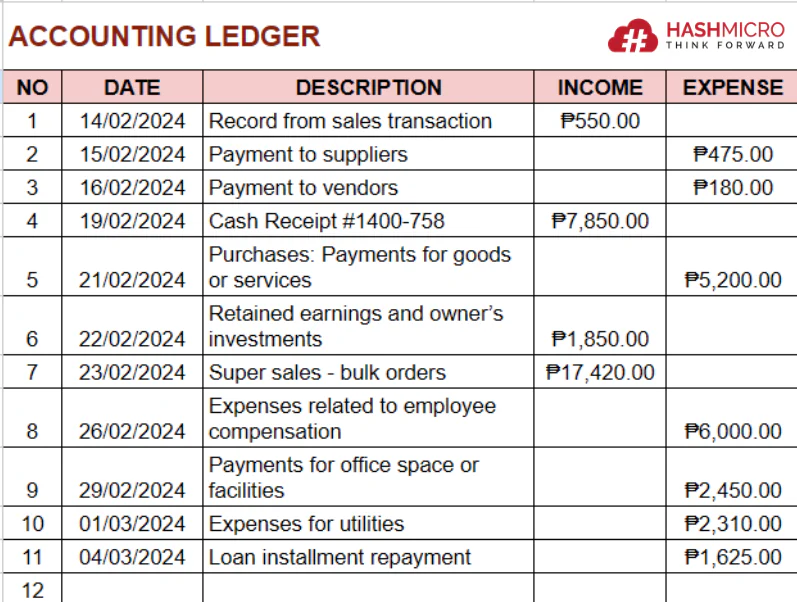
This template is ideal for managing everyday accounting tasks, such as tracking expenses and preparing financial statements. Whether you’re a small business owner or part of a larger organization, this tool simplifies your bookkeeping process.
Conclusion
A well-maintained ledger account keeps your balances traceable and your reports defensible, which matters as much for daily decisions as for a BIR audit. Categorizing entries by account means you can see your financial position at any point instead of waiting for month-end.
HashMicro's Accounting Software automates posting, reconciliation, and reporting, so your ledger stays current without manual re-entry. Try the free consultation and see how much of your period-end work can run on its own.

FAQ Around Example of Ledger
A ledger is a financial record that tracks all transactions within accounts like assets, liabilities, and revenue. Examples include a general ledger for all transactions and a subsidiary ledger for specific accounts.
To write a ledger account, record each transaction’s details, including date, account name, debit, and credit amounts. Use T-accounts to organize entries, showing balances on each side.
To solve a ledger account, total both debit and credit sides to find the account balance. Adjust any discrepancies to ensure accuracy in financial statements.