

An inventory management system is a digital solution that helps businesses control stock levels, track product movement, and maintain accurate records across locations. Its role becomes even more crucial when you consider that, according to a report by Procurement Tactics, fixing understocking and overstocking can reduce inventory costs by 10%.
Without a system, teams just guess. They run out of popular items and lose customers to competitors, overstock goods that expire, waste hours hunting stock in crowded warehouses, and face every supply chain delay without warning. Growing operations therefore need the best retail inventory software that Philippine vendors can support at scale.
Explore the full breakdown of inventory management systems to deepen your understanding of how they work. Continue reading to uncover the key insights and considerations that will guide smarter operational decisions.
Key Takeaways
An inventory management system (IMS) is a strategic tool that optimizes business operations by organizing product data.
Implementing inventory management solutions benefits businesses by optimizing stock levels, reducing costs, minimizing stockouts, and enhancing cash flow.
A robust inventory management system enhances the inventory process through features like real-time tracking, demand forecasting, automated reordering, and advanced tracking technologies.
Use HashMicro’s inventory management system for more efficient and cost-saving inventory management.
Types of Inventory Management System
There are several types of inventory management systems, each designed for different operational scales, industries, and business models. Here are the most common types of inventory management systems:
| Type | Best For | Main Strength | Limitation |
|---|---|---|---|
| Automated inventory management system | Businesses needing real-time, cloud-based stock control | Reduces manual work and improves accuracy | Needs setup time and user training |
| Spreadsheet-based inventory management system | Small businesses with simple inventory needs | Low cost and easy to start | Prone to errors and data corruption |
| Basic stock management system | Companies using general business software with simple stock needs | Adds basic inventory tracking to existing tools | Lacks advanced inventory features |
| Warehouse management system | Businesses focused on storage and warehouse operations | Improves warehouse organization and efficiency | Not a full inventory system |
| 3PL inventory management system | Logistics providers managing multiple clients and locations | Supports live tracking and cross-channel operations | Needs flexibility for varied client demands |
| Accounting and inventory management system | Businesses wanting finance and stock in one place | Keeps inventory and financial data aligned | Still less specialized than dedicated inventory software |
| ERP inventory management system | Large businesses needing one platform for many operations | Covers inventory, finance, HR, and supply chain in one system | High cost and broad failure impact |
| Barcode inventory management system | Teams needing accurate item movement tracking | Improves picking, packing, and traceability | Requires scanners, training, and setup cost |
| Cloud-based inventory management system | Businesses needing remote access and real-time updates | Accessible anywhere and easy to integrate | Depends on internet connectivity |
| Asset inventory management system | Companies tracking equipment, vehicles, and tools | Helps monitor important business assets | Not designed for full stock management |
Periodic vs. Perpetual Inventory Systems
A periodic inventory system and a perpetual inventory system are two different methods for tracking inventory. To see an intuitive overview, see the table below:
| Aspect | Periodic Inventory System | Perpetual Inventory System |
| Update Frequency | Updated at set intervals | Updated continuously in real time |
| Method | Physical count at period end | Automated tracking via software, barcodes, RFID |
| Accuracy | Lower day-to-day accuracy | High accuracy, real-time data |
| Complexity | Simple, manual process | More complex, tech-driven |
| Cost | Lower implementation cost | Higher system and equipment cost |
| Best For | Low-volume operations | High-volume, real-time operations |
Benefits of Inventory Management System

Inventory management shapes how well your business serves customers every day. The right inventory software Philippines businesses rely on keeps products available when demand arrives. Yet the gains reach much further than the shelf, and the five benefits of an inventory management system below explain why.
A system connects stock data with purchasing, sales, and accounting, so gains appear across the whole operation. Reliable inventory software, including AI inventory management tools, turns daily monitoring into decisions your team can act on. Each benefit below builds on that single source of numbers.
1. Avoids missed sales and dissatisfied customers
Picture a store running out of its best-selling product. The business loses that sale and often loses the customer to a competitor. A good system forecasts demand accurately, keeps popular items in stock, and minimizes stockouts before they cost you revenue.
2. Prevents financial waste from overstocking
Overstocking looks harmless, but it quietly drains resources. Excess inventory ties up capital you could spend on expansion or marketing, and perishable goods expire before they sell. The system flags overbuying early, so more cash stays available for other business needs.
3. Supports operational efficiency
Disorganized inventory clogs warehouses, slows down operations, and pushes labor costs higher. A proper system speeds up the movement of goods and keeps stock levels optimal, which lowers storage spending. Automation also handles manual counts, so staff spend their hours on strategic work.
4. Reduces risks in the supply chain
Delays, shortages, and sudden demand spikes hit every business at some point. Clear stock data acts as a buffer and lets you adjust strategy quickly. Accurate forecasts also guide smarter purchasing and unlock bulk-buy savings. Reliable data supports proven methods such as just-in-time (JIT) and material requirements planning (MRP).
5. Connects inventory with other business functions
Automation links stock data to order processing, purchasing, and production planning in one place. Every department then works from the same numbers instead of separate spreadsheets. Sales sees real availability, finance sees accurate inventory value, and buyers order against confirmed demand.
HashMicro ranks among the recommended inventory management systems in the Philippines. Companies across many industries trust its comprehensive tools to streamline stock control from one platform. Download the price scheme below to see how HashMicro fits your business.
Features of Inventory Management System

A solid inventory management system offers features that simplify and improve the inventory process. For businesses comparing inventory software Philippines options, these features help you evaluate real-time tracking, automated reordering, and fast-moving versus non-moving stock analysis before choosing the right system. Here are the important features you should look for.
1. Real-time inventory tracking system
This feature serves as a highly efficient assistant that keeps track of all inventory in real-time. It provides an exact count of every product in stock, records every sale and purchase as it happens, and tracks the location of every item, whether in storage, in transit, or delivered to customers.
2. Demand forecasting
Demand forecasting is like a business’ crystal ball, allowing them to anticipate future product demand. The system utilizes historical sales data and trends to forecast future sales volumes. Using product information management, businesses can make informed decisions on how much inventory to maintain to meet the projected demand.
3. Automated reordering
The automatic reorder feature acts as a smart shopping list for businesses, helping streamline material management and preventing stockouts of essential items. The system continuously monitors all products, tracking availability and identifying which materials are running low.
The system sets a reordering threshold for each product, and when inventory drops below that level, it automatically notifies the business or places an order.
4. Barcoding and RFID (Radio Frequency Identification)
Barcodes and RFID are two advanced features in inventory management systems, and both track items with precision. They speed up stock checks, cut labor costs, and reduce human error. They also improve supply chain visibility by tracing product movement from storage to delivery.
A barcode is a unique pattern of lines and spaces that holds information about an item. Scanners read the pattern and translate it into data your system understands. Barcodes cost little and print on almost any surface, which explains their popularity across every business type.
RFID uses radio waves to read small chips on tags or labels. Readers capture many items at once without direct line of sight. Each chip stores far more data than barcodes. Large warehouses adopt a full RFID inventory management setup because tags survive harsh conditions and support smarter stock decisions.
Methods of Inventory Management System
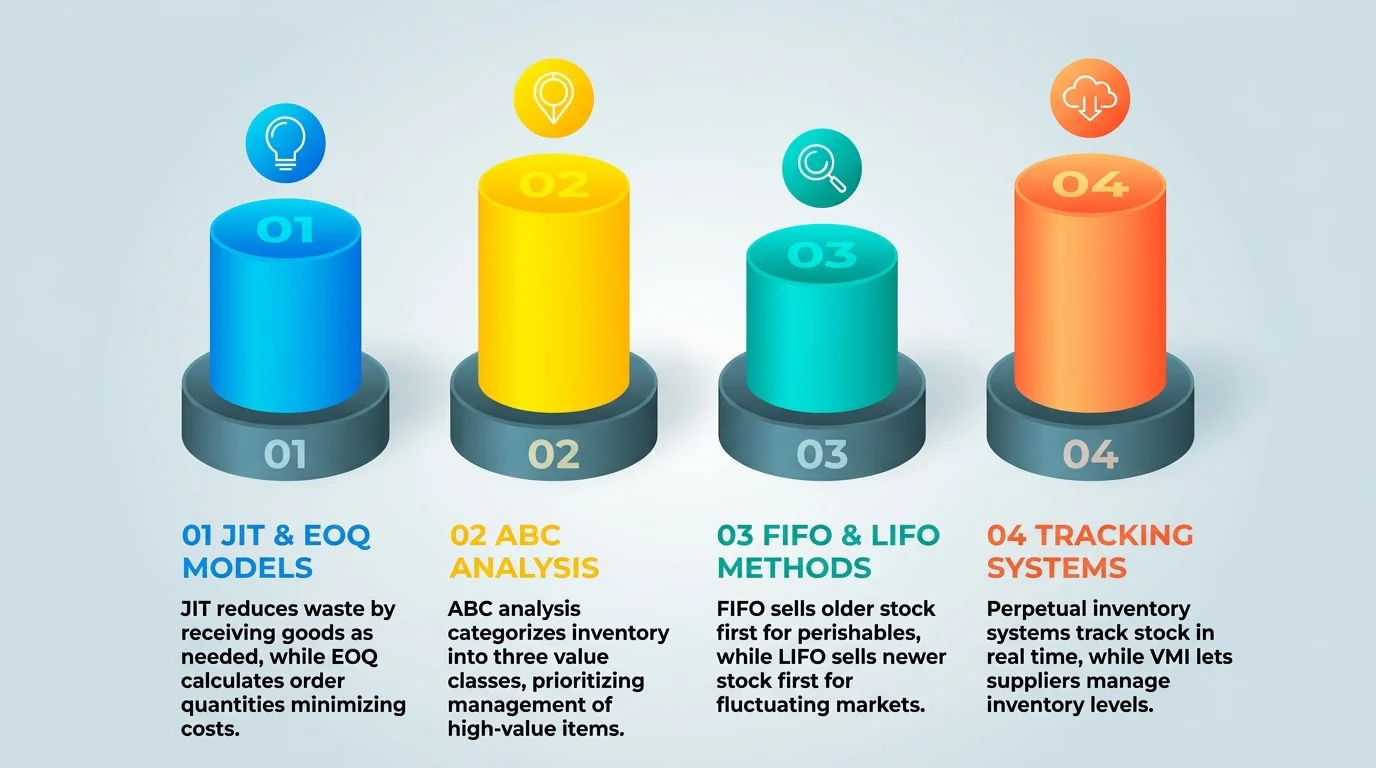
There are several methods businesses use to maintain efficient inventory control:
1. Just-in-Time (JIT)
JIT aims to reduce waste by receiving goods only as they are needed in production. While it minimizes holding costs, it requires precise demand forecasting and reliable suppliers.
2. Economic Order Quantity (EOQ)
This method calculates the ideal order quantity that minimizes both ordering and holding costs. It is a systematic approach, best suited to stable demand patterns. Companies with variable demand can apply different types of EOQ instead.
3. ABC Analysis
This method categorizes inventory into three classes:
A: High-value items with low sales volume.
B: Mid-value items with moderate sales.
C: Low-value items with high sales volume.
The focus is placed on managing high-priority “A” items effectively.
4. FIFO and LIFO
- FIFO (First-In, First-Out): Older stock is sold first, ideal for perishable goods.
- LIFO (Last-In, First-Out): Newer stock is sold first, often used for nonperishable goods in fluctuating markets.
5. Perpetual Inventory System
A perpetual inventory system uses an inventory control system to track stock in real time, updating automatically with each transaction. This method is highly accurate and efficient for large-scale operations.
6. Vendor-Managed Inventory (VMI)
In VMI, the supplier monitors and manages inventory levels for the business, ensuring stock availability while reducing the buyer’s workload.
How to Choose the Right Inventory Management System
A new inventory management system costs real money and changes daily routines, so the decision deserves care. First, confirm that your current setup has stopped keeping up. Then test each option against the five checks below before you choose the best E-Commerce Inventory Management Software.
1. Confirm you have outgrown spreadsheets
Spreadsheets stay rigid as your catalog grows. Two signs show you have hit the ceiling. First, you keep opening new sheets for new products, warehouses, or sales channels. Nobody can tell which file holds the current count.
Second, your warehouse staff still update the file by hand at the end of the day. Sales and purchasing therefore work from yesterday's numbers, so they oversell items or reorder stock you already have. Both signs put a cloud-based inventory system on your shortlist.
2. Assess your needs
Start with your own operation. Weigh your inventory size, process complexity, and must-have features such as real-time tracking or forecasting. Two signals sharpen the picture: staff struggles to confirm item quantities, and holding costs keep climbing. Both point to the features you actually need.
3. Check for integrations
Confirm the system connects with your accounting and sales platforms. Weak integration shows up fast. Your sales team keeps calling the warehouse to confirm stock, and manual reports still take hours to build. Strong integration removes that back-and-forth and saves real time.
4. Scalability
Pick software that grows with your business. A small shop today may run several branches in three years, and the system should handle that jump. When your current tools cap growth instead of supporting it, you have already outgrown them.
5. Vendor reputation
Research the vendor's track record before you sign. Read reviews, ask for client testimonials, and check how long the company has served your industry. A proven vendor is far more likely to deliver reliable software and responsive support after go-live.
One of the recommended inventory management options systems in the Philippines is HashMicro. Trusted by many companies in various industries, HashMicro offers comprehensive solutions to streamline inventory management. To get more information about HashMicro inventory management systems, you can download the price scheme below.

HashMicro as Your Comprehensive Business Solution for Better Inventory Management
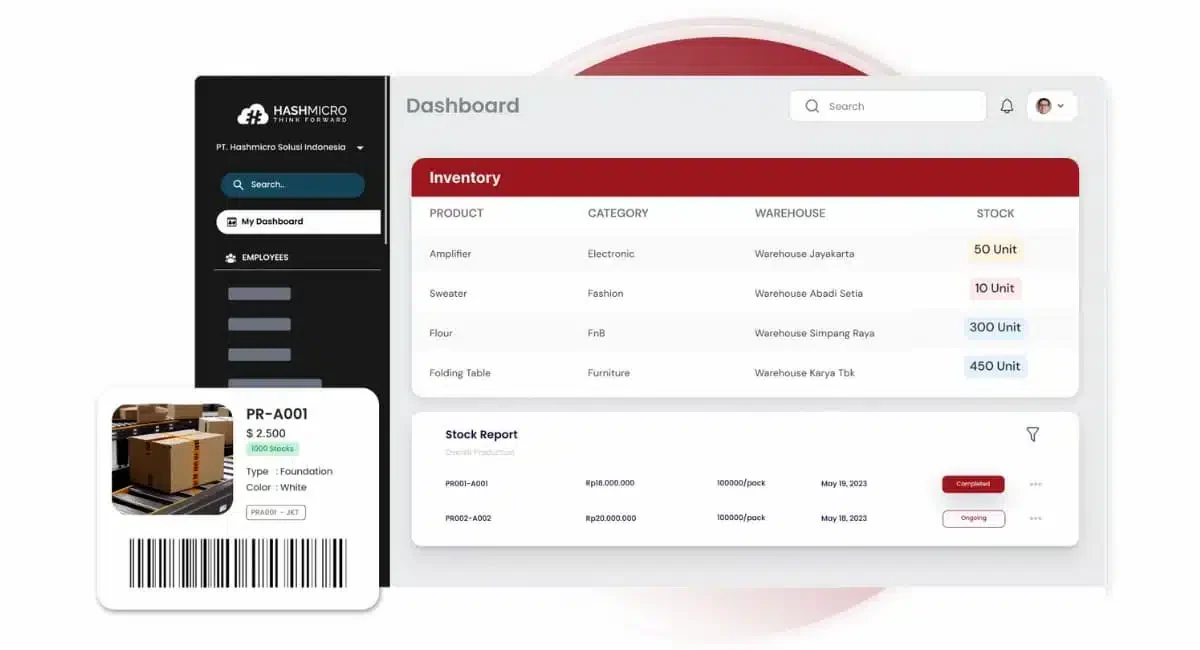
HashMicro offers an advanced inventory management system for businesses in the Philippines, built with seamless integration and scalability. For companies comparing inventory software Philippines options, HashMicro automates inventory processes and provides in-depth analytics to help optimize supply chain management.
Here are some key features of HashMicro’s inventory management system:
- RFID warehouse rack stock in-out automation: This feature uses RFID technology to automatically track products as they move in and out of warehouse racks. It speeds up inventory tracking, reduces errors, and saves time that would otherwise be spent on manual checks.
- Fast-moving, slow-moving stock analysis: This feature is a part of inventory analysis that helps businesses understand which products are selling quickly and which are not. With this knowledge, businesses can make smarter decisions about what to stock more of and what to phase out, optimizing their inventory for better sales.
- OCR for receiving: OCR (Optical Character Recognition) is used for quickly inputting information when receiving new stock. This feature streamlines the receiving process, making it quicker and more accurate, which can lead to smoother operations and happier customers.
- Stock forecasting: Stock forecasting uses past sales data to predict future demand. This allows businesses to prepare in advance, ensuring they have the right products available at the right time, leading to increased sales and customer satisfaction.
- Run-rate reordering rules: This feature calculates the rate at which products are selling and automatically places orders to replenish stock, ensuring order accuracy. It prevents stockouts and ensures that popular items are always available, which can boost sales and customer trust.
- Stock reservations and reporting: Businesses can reserve stock for specific orders and generate detailed reports on inventory status. This helps manage inventory more effectively and provides valuable insights for better decision-making.
- Stock optimizer per warehouse: This tool adjusts stock levels for each warehouse based on demand and other factors. It maximizes each warehouse’s efficiency, reducing waste and saving costs.
Schedule a free consultation today to see how we can transform your inventory management into a competitive advantage!
"An effective inventory management system forms the backbone of operational efficiency. With platforms like HashMicro supporting automated tracking and smarter decision-making, businesses can manage stock with greater accuracy and confidence."
Conclusion
In wrapping up, think of the inventory management system as the brain of your business operations, smartly managing your stock to save you time and money. With the right system, you can enjoy features like instant stock updates, accurate demand predictions, and effortless reordering, all of which are key to a thriving business.
Choosing the perfect system means considering your unique needs, ensuring it can grow with you, and that it meshes well with your current setup.
HashMicro’s inventory management software emerges as a standout choice, offering a suite of tailored features that cater to the modern business’s diverse needs. It’s designed to be user-friendly, efficient, and adaptable, setting you up for success.

FAQ About Inventory Management System
Inventory management software controls stock across the business, including purchasing, reorder rules, demand forecasting, valuation, and multi-location visibility. Warehouse management software focuses more narrowly on warehouse operations such as putaway, picking, packing, bin locations, and shipping. Many growing companies use both when fulfillment becomes complex.
Yes, small businesses can use an inventory management system, especially when spreadsheets start causing stock mismatches, missed sales, or overbuying. The best setup is usually cloud-based, easy to learn, and scalable, so the business can start with core tracking and add automation later.
An inventory management system reduces costs by keeping stock levels closer to actual demand. It helps prevent overstocking, dead stock, rush purchases, storage waste, and manual counting errors. Better visibility also lets teams reorder on time, avoid emergency buying, and free cash tied up in unsold inventory.
Look for real-time stock tracking, demand forecasting, automated reordering, barcode or RFID support, multi-warehouse control, reporting dashboards, and integration with accounting, sales, purchasing, and production. Strong inventory software should also support user permissions, audit trails, and scalable workflows as transaction volume grows.
Implementation time depends on business size, data quality, number of warehouses, integrations, and training needs. A simple system can go live faster, while multi-branch setups take longer because product data, locations, approval rules, and reports must be cleaned, configured, tested, and adopted by users.